
How To Add Facebook Comment Box To Blogger Blogs

MaxCDN Content Delivery Network

Facebook comment box is one of the useful tool for bloggers to increase conversations. Recently Facebook has launched many social plugins for bloggers and web developers and one such is improved Facebook comment box. So here in this post I will teach you how to add/integrate Facebook comment box to blogger in simple steps. Before getting into the process I recommend you to back up your template and previous comments in blogger wont be visible if you use Facebook commenting system.

Step 1: Visit Facebook developer page and enter your blog name, URL and click on Create application.
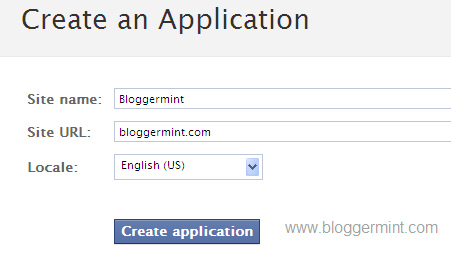
Facebook comment system for blogger

Now copy the App ID and save it in a notepad
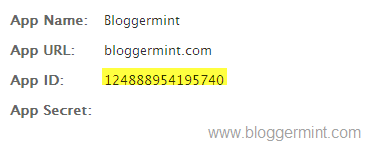
Facebook comment box for blogger

Step 2: Login to you Blogger dashboard and navigate to Layout > Edit HTML and check on Expand Widget Templates. Search for the code <data:post.body/> or <div class='post-header-line-1'/> and paste the code below <data:post.body/> or <div class='post-header-line-1'/> and save the template.

<b:if cond='data:blog.pageType == &quot;item&quot;'>
  <p align='left'><img alt='' class='icon-action' src='http://1.bp.blogspot.com/_ubwIhqPcR6M/S_bFnzvtkDI/AAAAAAAAA5A/ta5IbGqJZYU/s1600/cmds.png'/></p>
  <div id='fb-root'/>
  <script>
  window.fbAsyncInit = function() {
  FB.init({appId: &#39;APPID&#39;, status: true, cookie: true,
  xfbml: true});
  };
  (function() {
  var e = document.createElement(&#39;script&#39;); e.async = true;
  e.src = document.location.protocol  +
  &#39;//connect.facebook.net/en_US/all.js&#39;;
  e.async = true;
  document.getElementById(&#39;fb-root&#39;).appendChild(e);
  }());
  </script>
  <fb:comments/>
  </b:if>

Change the APPID on the code with your APP ID provided from Facebook and save the template.

Step 3: Now you need to hide default blogger commenting system. So navigate to Settings > Comments and select hide and save settings.

Facebook comment box for Blogger

Live Demo

Note: Using Facebook Comments will hide your blogger comments. So use this comment box wisely.

May 22, 2010. This entry was posted in Blogger, Facebook, Tutorials and tagged . Bookmark the permalink.

We Recommend HostGator Hosting

Bloggermint strongly recommends Hostgator Hosting for all of your web hosting needs. Sign up today for WordPress Hosting at just $4.95/month.

Use coupon code "bloggermint" to get 25% discount on any hosting packages. Get an account with Hostgator now!

No related posts.

286 Responses so far!

  1. hye i didnt found the code or in my blog template,..

  2. how can I chanche the language from the comment box?

  3. Thanks for the information, I will save it.

  4. How do I know when I’ve got a latest comment?

  5. How do I know my FB appid? example it is wat code?

  6. Saludes Franklin. Ha sido imposible agregar la caja de comentarios en mi blog , la plataforma que utilizo es Blogger…crees poder ayudarme? Saludes

  7. Im couldn’t find these code in my blog How can I replace it??? Is there any other way to replace it.???

    http://www.igeekfloor.blogspot.com

    Its my blog url…

  8. hi, Franklin!
    wgen I open Facebook developer page, it shows message like this:

    Your account must be verified before you can take this action. Please verify your account by adding your mobile phone or credit card.

    What does it mean? How can I get the Fb comment box? Please help.

  9. The comment box was working good and installed to your exact specs except now it appears randomly sometimes its there sometimes not. Any ideas.

  10. Hello, Can you please help me by getting this thing on my site.. i tried so many times…i couldnt do it…..

  11. Hi Franklin, please you must help me solve this problem. In your first step when i click on it i get this message “your account must be verified before you can take this action please verify your account by adding… Mobile phone or … Credit card blah blah blah. Then am confused no where to go. Please explain that point click me through please i need it

  12. It saya Application Id has to be porperly namespace with proper xvid..i dont know…

  13. Hi Franklin,
    I noticed that the same comments appear on each post. How can I have separate comments on each blogger posts?
    Thanks.

  14. On step two it says “paste the code below” what code? I’m stuck there!

  15. i suddenly lost my fb comment box in my blogger! what happened ?

  16. its not working :(

  17. @cyracks: enter your phone number and facebook will text you a code to go on!
    @ narayan: im with you!!! its driving me crazy! all of my comments repeat themselves on every single on of my posts! very annoying :(

  18. Hi,

    I am using a blog with a dark background. The font color of the posted comments are dark as well and hence cannot be easily seen. How do I change the color of the font?

    Thanks!

  19. how can resize the box , it does not fit

  20. is it possible to add it in google sites?

  21. I was just looking at Tech Crunch’s website and noticed that the comment box they have allows people to reply and like others comments. The one covered in this tutorial doesn’t make provision for that. Is there anyway the reply and like button can be included for blogger?

    Thanks!

  22. I am getting the following error!

    The comments plugin requires an href parameter.

  23. thank u man that s wat exactly i was lookin for … many thanks

  24. can i post links on my homepage from this blog ?

  25. Hi Manuel. I would like to share to you and your readers how we were able to workaround on the same Facebook comments appearing on all Blogger posts.

    Here’s the guide.

  26. great way to get more and more traffic thanks man

  27. why is this good if you don’t even use it?

  28. i think this is the best way to get more and more comments cause facebook is very popular

  29. Referring to your ‘Live Demo’, where should I place the code if I want Facebook Comment to be underneath Blogger Comment (I mean in between ‘Labels’ & ‘Home’ link)?

  30. i got the same prob as u gausscyan..

  31. Thanks. i applied it a while ago and its great, except for the size. How can i adjust the box size? thanks.

  32. The Comments Box in is a great way for any website, blog or photo gallery to add social comments to their page in just a minute with a few lines of code I like face book here is profile link please check :
    <a href="http://www.facebook.com/profile.php?id=100002414771667&v=info daniel mamann

  33. hi bro i got error URL must point to a directory (i.e., end with a ‘/’) or a dynamic page (i.e., have a ‘?’). when i wanna create in facebook can u help me ? :(

  34. how to put a comment box of facebook to my website.??”

  35. hey i have problem with that.. see my site http://careerport.blogspot.com problem is all comments comes with in single row..i mean not divercify at their palace.. how can we know who comment on which page..

  36. Thx your tutorial really helps me!

  37. rohini kumar

    thanks…really awesome service!!

    working fabulous on my blog!!

    thank you very much

  38. hey hi, i use a dark template, and it’s pretty difficult to read the text, how can i change the text (comments) color ?

  39. Thanks man! :) )

  40. I have don but when I clicked for preview it says
    “Your template could not be parsed as it is not well-formed. Please make sure all XML elements are closed properly. XML error message: Scanner State 24 not Recognized

    Error 500″

    How can I managed it. Hope your reply soon.

  41. Hi Franklin. I have a problem

    Error: “The comments plugin requires an href parameter.”

    How can I fix it?

  42. not working it shows all comments in single row how to fix it thanks careerport.blogspot.com

  43. I’m having hard time with the codes :(

  44. thank you man..its really work on my blog..previously i tried from other website..however, its not work…i really appreciated it..thanks again man :-)

  45. Your solution hide a link to love comments and does not work

  46. thank a lot dude :)

  47. Nice one…easy and clear steps

  48. not working for me.. why? “database down” error popup.. and sometimes i can post comment.. but when i refresh, the comment gone? what happened

  49. Nice tips…
    I think this creative way to optimizing our blog…

  50. How can I chanche from:http -> https
    Thanhks

Leave a Reply

Your email address will not be published. Required fields are marked *

You may use these HTML tags and attributes: <a href="" title=""> <abbr title=""> <acronym title=""> <b> <blockquote cite=""> <cite> <code> <del datetime=""> <em> <i> <q cite=""> <strike> <strong>