Its been a while many got impressed with Mashable’s floating social bookmarking widget and many tried and came up with a wordpress plugin. But actually people forgot about creating a floating social bookmarking plugin for blogger. So here in this post, I am going to teach how to add floating social widget to your blogger/blogspot blogs.
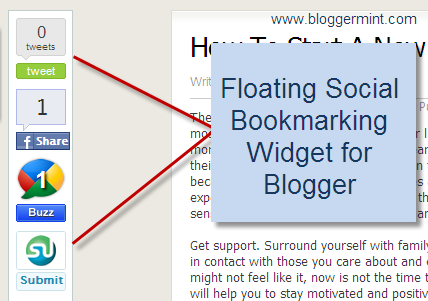
Step 1: Navigate to Edit HTML from Blogger dashboard and check Edit Widget Template. Search for ]]></b:skin> and replace it with the below code
#sharebox {
background-color:#FFFFFF;
border-color:#C1CDCD;
border-style:solid;
border-width:1px;
left:103px;
bottom:40px;
margin-top:10px;
position:fixed;
width:64px;
}
#sharebox .float {margin:7px}
.FBConnectButton_Text
{
font-size: 8px;
padding:2px 4px 3px !important;
}
]]></b:skin>Step 2: This step involves inserting the widget functions into your template. Therefore, place the below code before <div class='post-header-line-1'/>
<b:if cond='data:blog.pageType == "item"'> <div id='sharebox'> <div class='float'><script src='http://tweetmeme.com/i/scripts/button.js' type='text/javascript'/></div> <div class='float'><a href='http://www.facebook.com/sharer.php' name='fb_share' type='box_count'>Share</a><script src='http://static.ak.fbcdn.net/connect.php/js/FB.Share' type='text/javascript'/><div class='clear'/></div> <div class='float'><a class='google-buzz-button' data-button-style='normal-count' href='http://www.google.com/buzz/post' title='Post on Google Buzz'/> <script src='http://www.google.com/buzz/api/button.js' type='text/javascript'/></div> <div class='float'><script src='http://www.stumbleupon.com/hostedbadge.php?s=5'/></div> </div> <a href='http://www.bloggermint.com/2010/06/mashable-like-floating-social-bookmarking-widget-for-blogger/'><font size='0.3'>Bloggermint</font></a> </b:if>
Thats it and remember, the floating widget is visible only for blog post, so this widget won’t be visible on your blog homepage. If you need any customization on this widget, drop in your comments and you can also leave your questions at Bloggermint Answers


Pingback: Tweets that mention Mashable Like Floating Social Bookmarking Widget For Blogger | Bloggermint -- Topsy.com
This is a wonderful resource Franklin, your guides are getting good day by day and making your blog a must read for me, hope you could find a wordpress resource for this.
@Vishal – Thanks for your compliment and you can find resource about WordPress floating social bookmark plugin here
Nice Post Dude!
.-= Karthikeyan´s last blog ..Xbox 360 : Project Natal =-.
Good Job dude! I like your way of explain things. Simple but effective. Have a nice day.
.-= Nicola´s last blog ..Top 10 Freelance Writing Job Websites =-.
@Nicola and @Karthikeyan – Thanks for your encouragement.
Informative. But why couldn’t find that floating thing in this site? May be you don’t like it?
.-= Dadhakumar´s last blog ..Carefree Scissors =-.
@Dadhakumar – Not exactly, I came up with this tutorial, as many requested me for that. I already have sharing icons at the bottom of the post, so I found it unnecessary
Interesting resource Franklin, Thanks for sharing.
.-= Arafat Hossain Piyada´s last blog ..My New Theme, Issues and Your Help =-.
@Arafat – Thanks for your compliment dude
Pingback: Blogger Has Finally Added Share Buttons in Blogger Draft | Bloggermint
Interesting blog
It’s really awesome, But it overlaps the screen in low resolution Pcs
.-= TechGyo´s last blog ..Register or Find World Records In The Universal Record Database =-.
@TechGyo – Yes it overlaps, I am working on it. But only few are having low resolution PCs
Is there a way to place this into an html page?
Yaah thats true, Even I came to know only when i tested with adobe browser labs!
.-= Sreejesh´s last blog ..Google Earth Now with 3D Trees and Integrated Street Maps With More Realistic Feel =-.
@Lukes – Yes its possible. Just remove if conditional statement and use it on your html page.
thnx a lot for the share!!! i used it and is great!!!
TheSolution
.-= {ADMIN}Solution´s last blog ..FAR CRY =-.
Listn, I want to show this floating widget on my blogger homepage. For this What should I do..?
.-= Rajesh´s last blog ..Dreamhost Promo code and coupon for July 2010 =-.
@Rajesh – Remove the if conditional statement from the step 2. Thats it!
nice tips, is now available at my site. thanks!
.-= Ana´s last blog ..MGA PULIS KAMI =-.
thanks.
it looks great on my funny videos blog.
.-= funter videos´s last blog ..Luckliest People Compilation =-.
Thanks for such a nice tutorial.. However I am not happy with the way it is being displayed on my blog… When one scrolls down, the widget doesn’t move with the page and so looks weird. Can you please take a look at it ?
@Anshul – I can see the widget is working fine on your blog.
Thanks, finally got this working, BUT, the Digg button doesnt show up ….., just the stumbleupon, buzz and tweet….
Also, how can I put the counter button for Facebook in there (like the tweet and buzz buttons) instead of the compact facebook button
Gramkin Blog
Thanks bro!
.-= John´s last blog ..Links for 2010-07-15 Digg =-.
What are the parameters I could change to make this “floatie” move over more to the left. Thanks again man – great tip!
@MGD – The facebook share button that I used comes with the counter, once you make a share you will be able to see it. Then I haven’t added digg to my tutorial, if you need you can get it from http://about.digg.com/button
@John – Increase the left px value in the CSS.
Thanks that worked….great tutorial!
@MGD – Thats good
This is a really best tuts
.-= robin´s last blog ..10 Best Bloggers Across The Web =-.
@Glad you like it
hey, i can see only twitter button and on another browser i could see twitter, fb and THREE buzz buttons……how was tht?
@Malhaar – Which browser was that?
it is chrome….
@Malhaar – I could see its working on Chrome, might be some prob on your side.
Just wanted to say thanx for bringing this to the blogger platform! and for the simple and complete tutorial. Keep up the incredible work!
@D.Ferretti – Thanks, hope to bring even more new stuffs for blogger platform.
simple tutorial.. nice one
thanks … but not working for me …. its breaking the page when i add this widget … c here Blogosys
@Blogosys – Paste the step 2 code after this <div class='title'>
how can i also add digg and delicious into this floating bar so as to have 6 things..
Your help would be much appreciated
One more request.. Is it possible to use official twitter script instead?
(i saw an example on this site: http://blog.xmlgadgets.com/blogger/delicious-bookmark-button-counter-for-any-website-blogger-blog/)
And i would love to use this image for delicious, which i have come across on this site here: http://www.anshuldudeja.com/2010/06/delicious-bookmark-buttons-with-counter.html
(the image before which its written- A normal counter button like retweet button)
I think, you haven’t seen my recent post, I have written about a cool delicious counter button, check that here http://www.bloggermint.com/2010/08/add-a-beautiful-delicious-counter-button/
hi my blog
http://campbuzzz.blogspot.com/
i tried our code but its somehow the floating buttons r not coming i did xactly the way it has been told here ….can u plz help…
I am not able to see the second step – scripts on your blog.
I’ll be sharing this with my readers in next week’s installment of top blog posts of the week.
Nice tutorial
.-= Udegbunam Chukwudi´s last blog ..StrictlyOnlineBiz Top Blog Posts Of The Week 27 =-.
Thanks buddy
its nt working for me… can u plz help
I have made the widget to work within the inner page, not on the homepage.
i wana to know how to add page navigation to ii
Pingback: StrictlyOnlineBiz Top Blog Posts Of The Week 28
It is a great tutorial! I wasn’ t looking for this information but I find it useful.Anyway I need the other one, the wordpress plugin, but now that I know that exists, it will be easy to find it.
.-= Jorjette´s last blog ..Diferenţa dintre make money şi câştigă bani- 5 lecţii =-.
hey mate .for different browsers the website template differs, so we have to code according to the browsers and this features is avialble in digg digg plugin na??
.-= sureshpeters´s last blog ..SEO – A info for beginners =-.
Yes I know. Digg Digg is for WordPress, this post is for Blogger
hey frank, thanks man,was looking for this widget very badly and found out on your blog,before this i used a template provided by you .