
3 Essential Twitter Tech Tips For Bloggers

Twitter is an useful tool for sharing and of course its has helped blogger in many ways in promoting and building a better relationship with users. There are many Twitter tips available, but some are quite essential tips for every bloggers. So here are the essential Twitter tips for better blogging. Hope these tips are helpful in increasing Twitter conversations.

1. Twitter @Anywhere

Twitter @Anywhere is a cool feature that enables showing hovercards on your website, when you mention a Twitter username with @. To do that simply navigate to http://dev.twitter.com/anywhere and create the app. Once you get unique code, place it within </head>
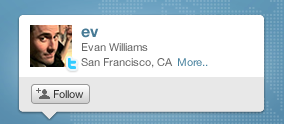
Twitter anywhere

2. Auto Hash tags using Google Feedburner

I hope we are aware of the automating tweets after you publish your blog post and of you look keen on that page, you can see the option Hash tags. Just enable the option by selecting “Create hash tags from item categories”. If you still wandering around how to configure it, just follow the steps below

Go to your Feedburner dashboard and navigate to Publicize > Socialize. If you haven’t added your Twitter account, add it now
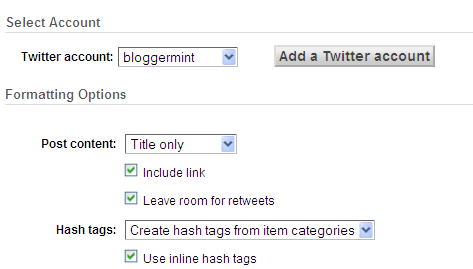
feedburner Twitter configure

3. Create your own Twitter retweet counter button

We all rely on third party services to share our tweets and most of us would be using Tweetmeme. So, if those services goes down for maintenance, the sharing gets stopped resulting in zero activity. Its not the case any more, now you can create your own retweet button in just two steps. If you are interested, read my tutorial here.


retweet button with counter

August 7, 2010. This entry was posted in Twitter and tagged . Bookmark the permalink.

We Recommend HostGator Hosting

Bloggermint strongly recommends Hostgator Hosting for all of your web hosting needs. Sign up today for WordPress Hosting at just $4.95/month.

Use coupon code "bloggermint" to get 25% discount on any hosting packages. Get an account with Hostgator now!

10 Responses so far!

  1. Great Article Frank! i use first two, which were so useful! and i never tried creating own button, but i will create one soon with the help of your tutorial!
    .-= Karthikeyan´s last blog ..15 Most Popular Twitter Clients InfoGraphic =-.

  2. Pingback: Tweets that mention 3 Essential Twitter Tech Tips For Bloggers | Bloggermint -- Topsy.com

  3. Great tutorial Franklin! I like Twitter Anywhere, I want to try it on my blog too. Thanks for sharing

  4. Pingback: Twitted by williampangbkk

  5. Pingback: Twitted by DivineChoice

  6. @Nicola – Twitter anywhere is a cool feature to bring more Twitter exposure.

  7. these are really too good.. Thnx

  8. Pingback: How To Add Tweet Box To WordPress | Bloggermint

  9. I hope I will get a lot more visitors over twitter now. Great tips.

  10. Thanks for the useful tips. Had to implement the auto hashtags.

Leave a Reply

Your email address will not be published. Required fields are marked *

You may use these HTML tags and attributes: <a href="" title=""> <abbr title=""> <acronym title=""> <b> <blockquote cite=""> <cite> <code> <del datetime=""> <em> <i> <q cite=""> <strike> <strong>