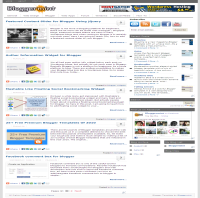
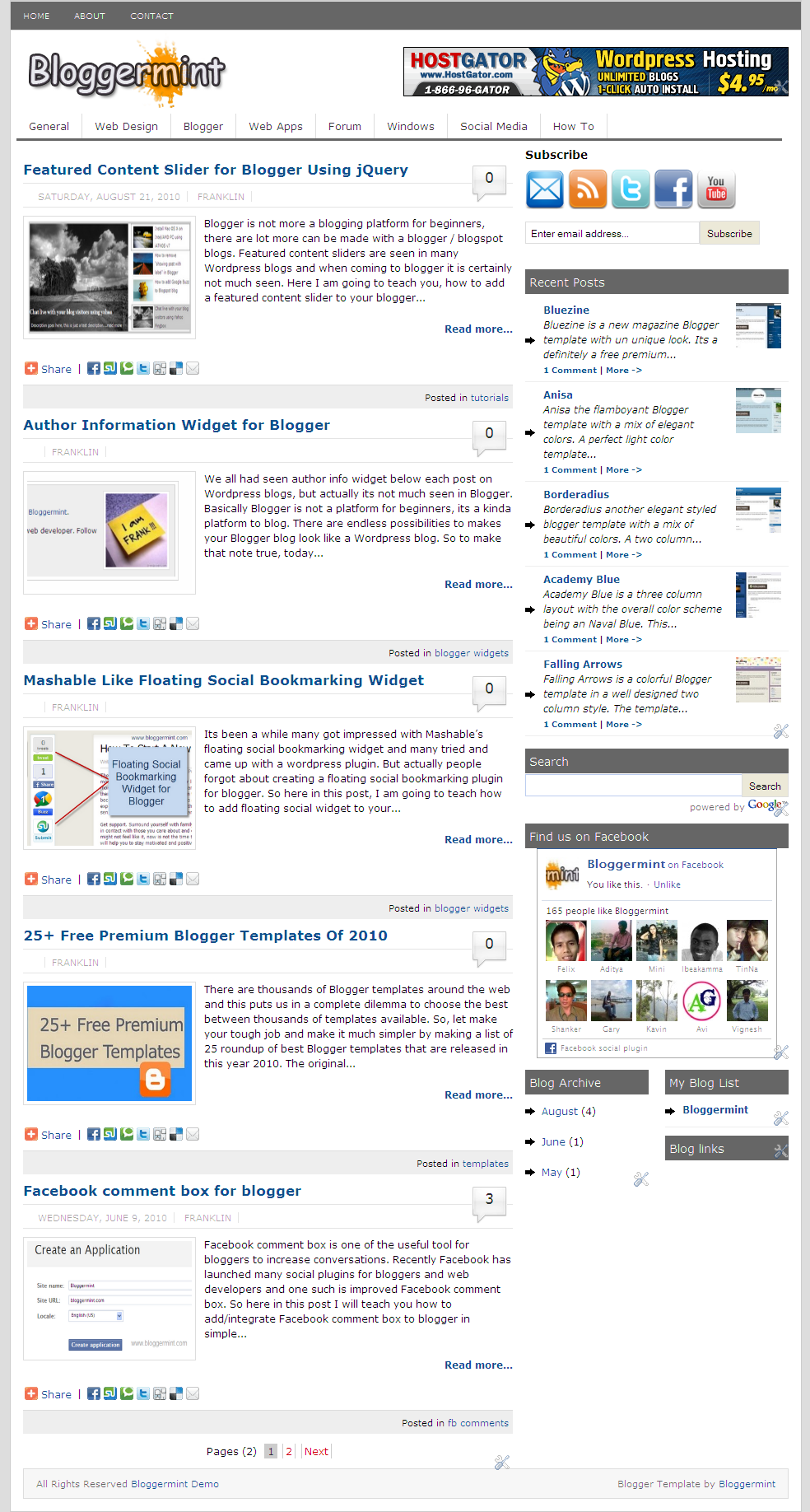
Finally its time for me to launch Bloggermint blogger template to all Blogger lovers. The template is a free premium category to satisfy users with almost all aspect and I hope you people like it. Bloggermint Blogger template was a WordPress look alike Blogger template and from now on, I have planned to release some premium Blogger template for FREE. Before, talking into the instruction part, let me point out the advantages and the features of this template.
- SEO optimized
- Clean and neat interface
- Premium features like bubble comments, page numbered navigation
- Easy to customize
- Author widget below every post
- Sleek Facebook and Twitter share count button
- Navigation bar with sub nav.
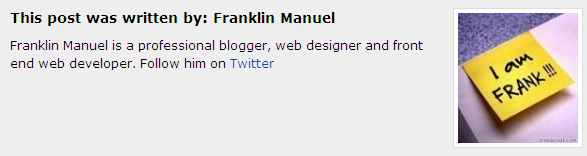
Author Info Widget
In order to edit the text in the author card, go to Edit HTML, expand the template and search for <div class=’author_info’> and change the necessary text, which you like to appear on the author card. To change the author image create an image with 130×130 pixels and change this URL http://i50.tinypic.com/iw7lec.jpg with your image uploaded URL.
Header Banner
You can see, a default ad display on the header bar, to place your ad instead of that – Go to Page Elements and click on HTML/Javascript box and replace the code with your banner code.
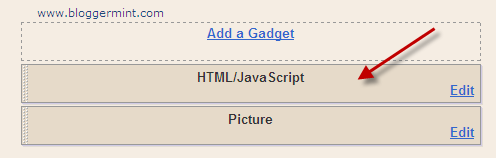
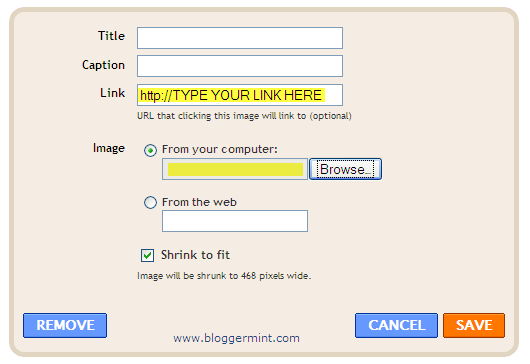
I have also added a picture box, where you can add an image and link the image to any affiliate links. You can either upload image from your computer or you can link it from your web server. By default all the image will be shrink to 468 pixels wide.
Twitter Share Button
By default the Twitter share has blogger as the share path, so to change that go to Edit HTML, expand the template and search for data-via=’bloggermint’ and replace bloggermint with your TWITTER HANDLE.
Subscribe Bar
By default subscribe icons has bloggermint links, to change that search for <h3 style='margin-bottom:10px;'>Subscribe</h3> and change it to your appropriate links.

Navigation bar
To change the default link that points to my blog, search for <ul id='nav1'> and change the link appropriately, then for the second navigation bar search for <ul id=’nav2′> and do the same process.

Still have any issue, drop in your comments. I will help you out.


Congrats for your new blogger template. It looks nice and professional.
One thing I want to point out is that the comment icon on the right side of post title is overlapping with the border. It don’t look nice. Just a suggestion. Overall the template is really nice
.-= Simrandeep Singh´s last blog ..6 Tips to Earn More Thoughtful Comments to Your Blog =-.
@Simrandeep – Thanks for such a valuable suggestion, removed the lines to give a better look.
Pingback: Free Download Bloggermint Blogger Template | Bloggermint | Blog News
Pingback: Free Download Bloggermint Blogger Template | DowloadsBlog.info
Great !
Now it looks better
.-= Simrandeep Singh´s last blog ..5 Tips to Comment Effectively =-.
Beautiful template design, what code would you suggest adding to the xhtml template if one has more than one blog author? Check the multiple author ‘hack’ on my blog via «view source», do you think that would work with this template? thank you
hi, i wanted ask about the sharing widget….. what will i have to get the summarised report from concerned sharing website?? where will i need to put the code??????
Sorry I didn’t get you, what you mean to say by sharing widget, are you asking about the Facbook activity widget??
no no, not about facebook widget….
please read the “important” given on following link…….
will i be able to add such thing??? or the sharing widget given here is in general and not user-id specific……..
i used your template but in my case, the post which i posted are appearing with full length post, not like the defined one “read more” type.
what can i do to solve this
because due to this the lenght of the page increases.
Can you add your URL here
Can you add your URL to let me see whats the problem going around your blog.
Please help me with this problem….
this is my trial blog http://chelseafansvoice.blogspot.com/
.if you go there then uou can see that the arrows in blog archieve are somewhat overlappinf the text…How to overcome this….
Search for this in the template and remove this background:url("http://4.bp.blogspot.com/_ubwIhqPcR6M/SxB5I8latgI/AAAAAAAAAQE/tUEaXs2Kob0/s1600/icofeatt.gif"
no-repeat scroll left center transparent !important;
it did work.. thank you ver much……
one more question…..
can i change the black-grey colour to blue?
as my site is sports team related which has blue as a main colour…….
and what image will i have to change for this?
Sure you can, just search for this color code #666666 and replace it with your preferred blue color. You can use our blog tools color picker to pick the best color http://www.bloggermint.com/blog-tools/color-code-picker/
http://techlevelinfinity.blogspot.com/
the above is the url of my blog
problem- post coming in full length instead of “read more” type
I have used a javascript to automatically insert read more, might be some conflict, however try using insert read more before publishing.
well, I am doing bit good in process to implement the template.
I wanted to ask you, how to implement when there are more than one authors???
I want to appear about the author info automatically as per te author who has written the post…
You can read more about it here and one of the commentator has shared a tip for multi author http://www.bloggermint.com/2010/03/author-information-widget-for-blogger/
how to create sub-sub menus?????
The sub menus are already there with my template, just copy that li to display under any category
no no i am asking about SUB-SUB menus…….
I recently downloaded this template–which is very nice and functional, love it!–but I am having difficulties with the “Recent Posts” widget. How do you get it to display like in the demo version? Nothing shows up in the section for my blog.
I appreciate your help
!
Ty for this theme! I´ve a on line shop, and i´ll see if feets for me. xo
Really awesome Blogger Template that you have made. Recently I’ve converted Platinum theme into Blogger Template. I guess you’ll love it
. Here is it: Platinum.
Thanks for the template
.-= Anup @ Hack Tutors´s last blog ..Releasing Platinum Blogger Template =-.
Looking good Anup
Great template…
I already used in my blog , Check it out
http://informasi-edukasi.blogspot.com
wow, they convert this template look more professional, How to do that? (change nav bar color, adding recent post & display archive in non standard blogger widget) ? Help me Franklin…
Use the add gadget to add recent post, display archives.
Then search for this in the template #nav {
background:none repeat scroll 0 0 #666666; and change the color #666666 to ur choice, to select color, you can use my blog tools http://www.bloggermint.com/blog-tools/color-code-picker/
Hi.
Thanks for sharing this wonderful template with us and helping everyone here with they may encounter.
this is the link to my blog.
http://mushau.blogspot.com/
The problem there as you can see is the little blue color stripe appearing at the end of each post just below
“Read more”.
The text “Posted in” appears in that stripe.
Could you please tell me how to get rid of this stripe with “Posted in” ?
Very Man Thanks.
I could see anything, as of such. Then kindly remove the “blog full of games” link from the footer. They are not affiliated with me. Some third parties are making use of my template.
how to change its width of sidebar?
Urgently need yr help here…
I don’t know why the comment bubbles and comment form under each post disappeared after I imported this template in blogger?
thanks.
.-= Jonerdo´s last blog ..望鏡的重要 =-.
Have you disable the comments in setting?
No, I haven’t..
I just imported the template and didn’t disable any setting…
Excuse me for asking one more question.
Is there a way to widen the main wrapper in the static page to automatically fit the whole page after removed the sidebar?
Thanks.
Can you revert the template to normal and try it once again.
To widen the main wrapper in static page, you need to use <b:if cond='data:blog.pageType != "static_page"'>
Wrap the widget code inside here
</b:if>
oh.. I got it fixed by enabled the comments in setting.
thanks so much for yr advice!
when i follow step by step to install the intensedebate comment system on this template and click “save” in the last step.
error message shown up as below:
Your template could not be parsed as it is not well-formed. Please make sure all XML elements are closed properly.
XML error message: Element type “span” must be followed by either attribute specifications, “>” or “/>”.
could anybody teach me how to fix it?
many thx.
Hi, Thank you for this very wonderful template, just want to ask, how can I edit the font size of my post here?
Can you please help me on how to move the Search Box to the top of Subscribe Widget?
Current position is good but I think for my content it would be better if it could be seen on the uppermost.
Can’t move it above because the Subscribe Widget is not editable to move?
Can you tell me how to do it? Thanks a lot.
I am reading your blog from last few weeks and I like your free blogger themes . I have just created one free blog templates collection on my blog and added few of your templates in it . I hope you will like this collection .
50 Free Blog Templates for Blogspot
Thanks
Hey it’s great!! I like it as i want this blogger template as it is very nice…
Thanks for sharing it…
.-= kindle´s last blog ..Emotional Freedom Technique E-Book =-.
Hello Friend,Can You Please Add The Same Look To The Navigation Link Bar As Seen Like Your Navigation Bar
Please Help Us Doing It
..
.-= saikrishna´s last blog ..How To Show HTML-CSS Codes In Blog Posts =-.
And Forgot To Say….! Can You Also Add The Widget Popular Posts,Recent Posts,Random Posts Widget To The Template As Shown In Your Blog
Please…
.-= saikrishna´s last blog ..How To Show HTML-CSS Codes In Blog Posts =-.
What I have it here is for WordPress, but there are tutorials to add tabbed sidebar for blogger.
thanks for the beautiful template
.-= chris´s last blog ..on mobile tacker some idea about c6-00 =-.
how to add page numbers and related posts please help me >>>>>
thanks in advance
The page numbering comes with the template by default. Regarding related post, search in Google to find the best type which suits you.
how to change the colour of headings
Do you meant he color of the header?
no the post headings
how to change the icon in the url address bar
Search for <b:skin> and above that you will find the link to the icon. Remove that URL and replace with yours.
thanks
how do i change the colour of headings in posts and the arrow mark in the side bar wigets are actually overlaping with the words
Search for #header in the template and change the background color.
thank you for template.
you can change this template rather than a normal style magazine, I mean that the publications displayed out complete.
if, if possible please tell me how. a greeting.
Thanks to much i download it and use in my blogger!
I love it,, very stylish elegant
Can I replace Navigation bar
with Google Adsense on header,.. please Help me!
Thanks
I used this template http://vibiz.blogspot.com
How do I replace Navigation bar
<ul id=�nav1�>
<ul id=�nav2�>
with Google Adsense 728 X 15 on header,.. please Help me!
Thanks in advance!
I used this template temporary on http://vibiz.blogspot.com
Great Layout. This is the best I have seen! Just one question… How do I replace the ads/links in the footer to my own?
Sponsors: Link building | Hospital Job Openings | South Africa Dating
Thanks,
Jennifer
You don’t see any sponsor links in this template.
Hi Franklin, I am hoping you can help me out. I am trying to install this template into my blog, I have changed everything that I needed to change, but when I go to preview it, it tells me something about XSS error, and I can’t download it into my HTML section on blogger. I love this design, and am coming to my wits end.
Meu Blog e esse aiw:
http://oficinadosnerds.blogspot.com/
this template dont work dude proper, when i installed this template for my blog,
http://www.webprogrammignscripts.blogspot.com it gave me an error as below
* Describe what you were doing when you got this error.
* Provide the following error code and additional information.
bX-1pw4km
now what do i do, how do i solve it, pls help
The prob which you mentioned is not associated with the theme, can you try it once again. Also I don’t see your blog working
Hi Franklin, is it possible to add widget bar footer? I meant I’d like to place some third party widget at the bottom of the page. Can I do that?
Hii franklin, how to add three column widget in footer??
hi franklin, thanks for this fantastic template. I would like to ask why is the page navigation bar not appearing in my blog pages? I would like also the navigation 1 to be static pages such as “contact”, disclaimer”, etc., can you help me how to remove the create summary and “read more” in those pages?
this is my blog url: http://millionpossibilities.blogspot.com/
many thanks.
Images are not coming
im using it . awesome!
is there any way i can put a featured content slider in it?
I want same theme but for my WordPress Blog. Can you please help me.
hello i liked your template and i have added this template to my site can you help me how to change the background to some wht good
thanx for such a beautiful theme…i was waiting for it from a quite long time…but the top navigation(categories) is not looking good…may be the white color is mingling with header…how can i change the top menu bar color
Thanks for the awesome template.
Can find the RSS button. I want to follow you! Please HELP!