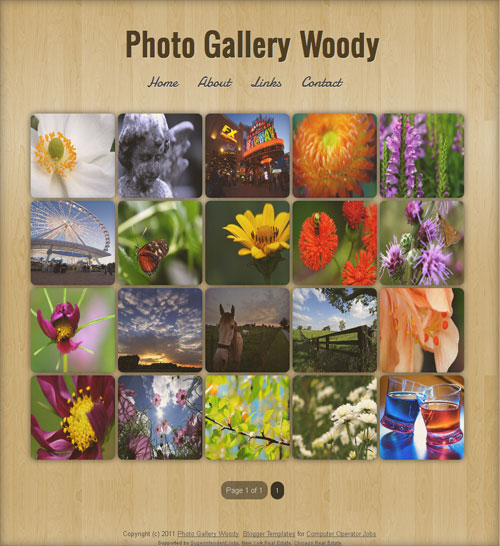
We are proud to release our freemium Lightbox-implemented blogger templates, Photo Gallery Dark and Photo Gallery Woody. To spice up the look, CSS3 implementations such as box shadow, border radius, and transition have been made in these two templates. Also, Google Custom webfonts Damion and Oswald were used for blog header and navigation bar.
Some other features :
1. Auto-thumbnail generation
2. Numbered bottom page navigation
3. Cool post comment avatar style
4. Fade in-out effect using CSS3
5. Lightweight
6. Fast-loading
Photo Gallery Dark
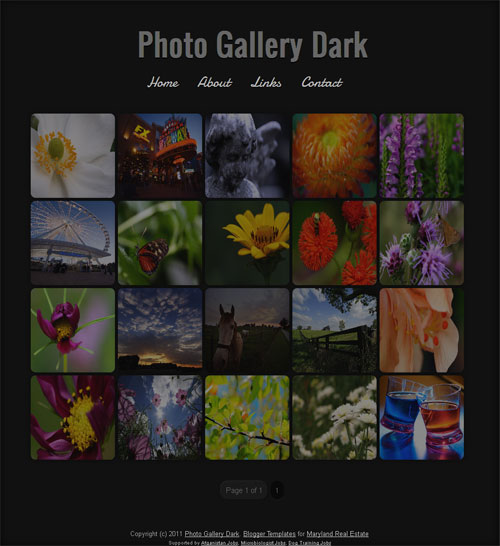
Photo Gallery Woody
Template Instructions
To set the number of thumbnails/posts to be shown in the home page, go to Blogger Dashboard > Settings > Formatting > Set the number of Posts to be shown in home page as 20.
We have enabled the lightbox effect only for the images on homepage and archive pages. If you want to add lightbox even for single post images, add rel=”lightbox” before the href attribute.
Please keep the footer credit links intact. If you want to remove the link you have to pay a little fee. Also check our Blogger Template site Blogger Templates Hub Blog for latest blogger templates.


Супер =)))
very nice , i prefer the dark one
can you please make a template like this website has
http://wa**z.ag
If you want custom made template contact us using our contact form.
WOW…it’s cool bos…xixixi
) 
No i don’t want a custom one. If you can, make a freebie
Very, very nice. Thanks for sharing.
Great looking templates. Franklin in a star!
hye franklin..
i download n use this template but i confuse something..
how you do infront pages dont have post a comment but another pages have post a comment?
please help me.
If you hover on the images, you can see the link icon. Just click on it which will take you to the inner post.
How to automatically add lightbox plugin affect ?
Lightbox is automatically added for the pictures displayed on the homepage. Only you need to add it manually for the inner post.
Love it thanks! is there a way to make a thumbnail out of more than one picture per post? Is it just one per post, the first?
thanks
You can add any number of images in a single post. However the first picture will be displayed on the homepage.
Hi… Nice work.. I have downloaded this template days b4 and used for my blog. I was experiencing some problems…
the main page takes about 20 posts of pics.. But the I cant see other pics other than 20..
How to add additional page in the footer (Page 1 of 1).. To get all my uploaded pics to get displayed… Help me out of this plzz…
The template will automatically display page numbers, if you have more than 20 posts.
i prefer the dark one, it’s awesome for album photo
Please specific How to add lightbox effet for each image on every post, where to place the code ?
Hi! If you want to add lightbox even for single post images, add
rel="lightbox"before thehrefattribute. For example like this:-You can add the
rel="lightbox"using HTML view on post editor in Blogger.Hello i love it but i have a litle problem with the thumbnail
http://sofiavach.blogspot.com/
i dont know what hapen help me please!
i didnt change anything in the template code, the last thing i did was to erase all the photos and begin again… i dont wanna change the design of my page i love it like it was before
Hi Sofia, have tried downloading the template again and reuploading it to your blog? I suspect the code for thumbnail generator broken.
yes, i’ve tried but nothing change
any idea? please
i have a thumbnail generator broken problem
I uploaded the template, though there isn’t much instruction on how. to http://candacecherie.blogspot.com/ and the light box doesn’t seem to work on the homepage as it should, any ideas?
Hi there, thanks for this awsome template.
May I ask you how to change the size of light box pics on the main page? They are very small. Main page -> click on thumb -> small pic.
Thanks for your help.
Hi…
Its awesome…template however I’m facing issue with setting number of Post on home page. I’ve tried instruction provided “To set the number of thumbnails/posts to be shown in the home page, go to Blogger Dashboard > Settings > Formatting > Set the number of Posts to be shown in home page as 20.”.
Could you please assist.?
My Blog-http://www.gunjangoelphotography.org/
Warm Regards
Gunjan
Hi Gunjan!
How many posts do your blog have? The script will show 20 only if (20 or more) posts are available.
Hi, I like the template a lot. However, for pages like “About” there exist a small “on – ” after the posts. May I know how to remove it? Thanks.
Check my comment below for the solution.
I noticed that “on .” appears at the bottom of every page (About, Contact, Links, etc.) that is added to the blog. Is there a way to remove this? Thank you!
Thanks Heather for keep us aware of it. To fix it, go to the template file and add this code after the
]]></b:skin><b:if cond='data:blog.pageType == "static_page"'> <style> .post-footer { display:none; </style> </b:if>Worked perfect. Thank you for all of your help!
It also happens inside each post.
Do you know where do i have to paste the code to solve it?
Thanks!
i cut and pasted the code but it’s still showing “on” on my posts.
hello my blog has been so
http://danielsato.blogspot.com/
thumbs generator and the error does not make the images appear correctly
help
I think you figured out the issue.
Hello,
First of all, I love your template! Thank you very much for making it!
I was wondering if it was possible to include the image title or caption in the lightbox window. After looking through the Lightbox support forum, I found it is possible to make a single caption for all of the thumbnails on the homepage (ie. something like “rel=”lightbox” title=”my caption”), but I was wondering if it was possible to include some code that automatically links the lightbox caption for each thumbnail with the image caption from the original post.
Thanks!
Yes you can add caption, but that would output the same caption for all images.
Thanks,
So there is no way to tag the image caption from the post to the lightbox caption on the homepage?
How to add pages?
Use the pages widget on Page elements.
i’m having an overlapping thumbnail after uploading my pictures..how to solve it?
i guess we are having the same problem
Hi, first of all: I love this Template! Great work!
But: Is there a way to have normal corners on the thumbnails? I think it would look even better instead of the rounded corners.
(Sorry for my English, I’m Swiss…)
Greets
Adrian
bro whn u make a new post then give title to them its automatically in shaped….!!
Hi!!
After looking so much on the internet, i only like your template for displaying my photos. except when i used it i realised that when you click another page, cause i have like 6 pages. The other pages except for the home page is a normal theme – all the posts are listed all down like normal.
Is there a way to put same theme as the home page to all the other pages? where its all pictures and not just basic posts? If so I would really love it
PLease let me know ASAP. Thanks a lot for your help
Look forward to hearing from you!!
How can i put an iframe in the pop up image?? before the close X
i want to put that code. Coz its better if Like BOX is there.
i cant insert this one
How can i put a like box using an iframe code in the pop up image?? before the close X
i want to put that code. Coz its better if Like BOX is there.
i cant insert this one
Hello ,
I am using this for Picasa Slideshow album , each post have a web picasa slideshow .
I am getting an error when press the home button ,instead of thumbnail of my slideshow post , i am getting my first slideshow on the home page .
And when I opem the Home page with its URL , no thumbnail is showing .
Can you please advise .
Thanks .
is there any way that you can put the photo in without the thumbnail being all streched?
I want to make a Blogspot photo blog with integration of my 200 Web Picasa albums . Can you please advise :
1. Which template is suitable for this . I like Photo Gallery Dark , Great job .
2. I want thumbnail of all the album in the home page , clicking on the thumbnail should open the album in lightbox .
3. Is there any way to integrating the Web Picasa album in blogspost instead of uploading it again .
Please suggest .
Hii everyone,
i was trying to create a photo gallery and was gone through some editing but has messed up…..
everything’s working fine but i want to know how to delete a second page if you have all your images on your first page????
actually i edited the template to hold the actual size of the images or the size best suited for the images….
1. please check this
http://wallmines.blogspot.com/
2. see the last three images.
3. then go to the second page.
4. there are the same images in addition to the other 2 images.
guys i want to create the pages to have 28 posts or pictures but i m having problem….
please help……
hi
how are you?
thanks for making wood photo gallery
i want add one thing more in my blog
in home page when we click on thumb
open photo in box on page
i want show this box with next , black buttons and downloading link original Size of photo.
open all post photo in box. Not clicks one by one
Help me please
thanks
hi every one
how are you?
thanks for making wood photo gallery
i want add one thing more in my blog
in home page when we click on thumb
open photo in box on page
i want show this box with next , black buttons and downloading link original Size of photo.
open all post photo in box. Not clicks one by one
Help me please
thanks
Great piece of work.
Thanks for it!
Just a suggestion: it would be great if on the white part of the photo you could read the title of it
Hi,
Since two days ago something is not working correctly. When you select a pic, after having seen it you must close it twice in order to get to the main menu again.
Does anybody know why is this happening and how to solve it?
Thanks in advance.
I think I’ve discovered the reason for the failure of double seams: “When selecting a photo, after you’ve seen, you must close the two times to return to menu.” in my blog, I began to happen when I got photos of more than 200 kilobytes of weight, then, to reduce weight because it took too long to open, I have not happened again, so it may be why.
Jack checks if you have pictures that weigh a lot and if so reduce it to see that this
Pingback: 30 Blogger Template Terbaik 2011 « Buat Situs
Hi guys, awesome template thanks!
i have the same problem as Gato, i select a pic and i have to close it twice to get to the main menu, i need to solve this please, i’d appreciate any help
Hello,
Please check my blog http://soni-india-pariwar-photo-gallery.blogspot.com/, the images not showing properly according to your templete..
can you please fix this problem?
Thanks
Hi, I’ve using this template for my photography gallery. I’ve modified and customized to my own taste. Dont worry, I’ve still put the credit.
I wanna know, why thumbnil doesn’t look proportional
Hello
my blog is
http://www.kaltoe.blogspot.com
The imagens options only close. No have next, back arrows or buttons.
want show this box with next , black buttons and downloading link original Size of photo.
How add scipt
Hi
The template in large image have only close button.
i want show in lightbox with next , back buttons for others photos.
How i do it?
Thanks
Hi…I want to use this template in my wife’s food blog. Can some one help me where the change the link for the images…i want to show thumbnails from her food blog….i am new to this so any help will be appreciated.
Hello
i like the dark one.. but i’m gonna make it fluid . all picture are loading with original size. but to make quick load of this theme , we should use auto thumbnail js…
thanks
I have seen a very crazy pure CSS 3 gallery demo at this site http://www.netzmuehle.at/ueber_uns/fotos
can u also add such features?
Superb thts all .. brilliant yaar.. thnx for sharing.
Pingback: Download WP Themes Gadgetine v1.0.4 » Theme Forest
Sometimes the thumbnails become stretched! what can I do? Can I add manual thumbnails? squared ones so they don’t become “ugly”
niche info… thanks
Hello!
When I press image a lightbox preview activates. To go on post ‘more’ I have to press bottom right link. Is it possible to go on post ‘more’ I have just press image?
Pingback: Photo Gallery Dark and Wood - Photo Gallery Blogger Template