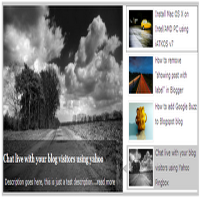
Featured Content Slider for Blogger Using jQuery

MaxCDN Content Delivery Network

Blogger is not more a blogging platform for beginners, there are lot more can be made with a blogger / blogspot blogs. Featured content sliders are seen in many WordPress blogs and when coming to blogger it is certainly not much seen. Here I am going to teach you, how to add a featured content slider to your blogger / blogspot blogs. Many thanks to Webdeveloperplus for making this code and I just tested and modified to work on blogger.

Featured Content Slider for Blogger Using jQuery

Step 1: Let get into the coding part. Here I just made a CSS stylesheet, to make the installation pretty simple. So all you need to do is just copy the below code and paste it after <head>

<link href='http://sites.google.com/site/bloggermintcom/style1.css' rel='stylesheet' type='text/css'/>

Step 2: If you need to change the dimensions of the slider you can use this step instead of step 1. Search for the code

]]></b:skin>

Now the place the below code before ]]></b:skin>

#featured{
width:400px;
padding-right:250px;
position:relative;
border:5px solid #ccc;
height:250px;
background:#fff;
}
#featured ul.ui-tabs-nav{
position:absolute;
top:0; left:400px;
list-style:none;
padding:0; margin:0;
width:250px;
}
#featured ul.ui-tabs-nav li{
padding:1px 0; padding-left:13px;
font-size:12px;
color:#666;
}
#featured ul.ui-tabs-nav li img{
float:left; margin:2px 5px;
background:#fff;
padding:2px;
border:1px solid #eee;
}
#featured ul.ui-tabs-nav li span{
font-size:11px; font-family:Verdana;
line-height:18px;
}
#featured li.ui-tabs-nav-item a{
display:block;
height:60px;
color:#333;  background:#fff;
line-height:20px;
}
#featured li.ui-tabs-nav-item a:hover{
background:#f2f2f2;
}
#featured li.ui-tabs-selected{
background:url('http://i47.tinypic.com/6jojr4.jpg') top left no-repeat;
}
#featured ul.ui-tabs-nav li.ui-tabs-selected a{
background:#ccc;
}
#featured .ui-tabs-panel{
width:400px; height:250px;
background:#999; position:relative;
}
#featured .ui-tabs-panel .info{
position:absolute;
top:180px; left:0;
height:70px;
background: url('http://2.bp.blogspot.com/_ubwIhqPcR6M/TNv3EFphS6I/AAAAAAAABHE/iZ0jSrh-E_c/s1600/transparent-bg.png');
}
#featured .info h2{
font-size:18px; font-family:Georgia, serif;
color:#fff; padding:5px; margin:0;
overflow:hidden;
}
#featured .info p{
margin:0 5px;
font-family:Verdana; font-size:11px;
line-height:15px; color:#f0f0f0;
}
#featured .info a{
text-decoration:none;
color:#fff;
}
#featured .info a:hover{
text-decoration:underline;
}
#featured .ui-tabs-hide{
display:none;
}

Step 3: This step involves the featured content structure. Search for the code
<div id='content-wrapper'> and place the below code just before
<div id='content-wrapper'>

<div id='featured'>
     <ul class='ui-tabs-nav'>
         <li class='ui-tabs-nav-item ui-tabs-selected' id='nav-fragment-1'><a href='#fragment-1'><img alt='pic1' src='http://i49.tinypic.com/e1aohv.jpg'/><span>Install Mac OS X on Intel/AMD PC using iATKOS v7</span></a></li>
         <li class='ui-tabs-nav-item' id='nav-fragment-2'><a href='#fragment-2'><img alt='blogger' src='http://i438.photobucket.com/albums/qq108/fooble11/image2-small.jpg'/><span>How to remove &quot;showing post with label&quot; in Blogger</span></a></li>
         <li class='ui-tabs-nav-item' id='nav-fragment-3'><a href='#fragment-3'><img alt='buzz' src='http://i438.photobucket.com/albums/qq108/fooble11/new1.jpg'/><span>How to add Google Buzz to Blogspot blog</span></a></li>
        <li class='ui-tabs-nav-item' id='nav-fragment-4'><a href='#fragment-4'><img alt='chat' src='http://i50.tinypic.com/34xfg4m.jpg'/><span>Chat live with your blog visitors using Yahoo Pingbox</span></a></li>
     </ul>
     <!-- First Content -->
     <div class='ui-tabs-panel' id='fragment-1' style=''>
        <img alt='mac' src='http://i47.tinypic.com/rsbi80.jpg'/>
<div class='info'>
         <h3><a href='#'>Install Mac OS X on Intel/AMD PC using iATKOS v7</a></h3>
         <p>Description goes here, this is just a test description....<a href='http://www.bloggermint.com/2010/02/install-mac-os-x-on-intelamd-pc-using.html'>read more</a></p>
         </div>
     </div>
     <!-- Second Content -->
     <div class='ui-tabs-panel ui-tabs-hide' id='fragment-2' style=''>
         <img alt='' src='http://i50.tinypic.com/33kprh5.jpg'/>
         <div class='info'>
         <h3><a href='#'>How to remove &quot;showing post with label&quot; in Blogger</a></h3>
         <p>Description goes here, this is just a test description....<a href='#'>read more</a></p>
        </div>
    </div>
     <!-- Third Content -->
     <div class='ui-tabs-panel ui-tabs-hide' id='fragment-3' style=''>
         <img alt='' src='http://i47.tinypic.com/2191lqt.jpg'/>
         <div class='info'>
         <h3><a href='#'>How to add Google Buzz to Blogspot blog</a></h3>
         <p>Description goes here, this is just a test description....<a href='#'>read more</a></p>
         </div>
     </div>
     <!-- Fourth Content -->
     <div class='ui-tabs-panel ui-tabs-hide' id='fragment-4' style=''>
         <img alt='' src='http://i48.tinypic.com/10pwp3o.jpg'/>
         <div class='info'>
         <h3><a href='#'>Chat live with your blog visitors using yahoo</a></h3>
         <p>Description goes here, this is just a test description....<a href='#'>read more</a></p>
         </div>
     </div>  </div>

Replace the default image URL with your image URL. The bigger image dimension is 400 * 250 and for smaller its 80 * 50. Do insert your image with these dimensions, to make it look better. Also replace the text and link with your info.

Step 4: Now we need to initialize a script to play the slide show. For that we use this script. Place the below script just after <head>

<script type='text/javascript'>
$(document).ready(function(){
$(&quot;#featured&quot;).tabs({fx:{opacity: &quot;toggle&quot;}}).tabs(&quot;rotate&quot;, 5000, true);
$(&quot;#featured&quot;).hover(
function() {
$(&quot;#featured&quot;).tabs(&quot;rotate&quot;,0,true);
},
function() {
$(&quot;#featured&quot;).tabs(&quot;rotate&quot;,5000,true);
}
);
});
</script>

Step 5: This is an optional step, if your blog already includes the jQuery and jQuery UI libraries. If not, follow this instructions. Copy the code below and paste it after <head>

<script src='http://ajax.googleapis.com/ajax/libs/jquery/1.3.2/jquery.min.js' type='text/javascript'/>
<script src='http://ajax.googleapis.com/ajax/libs/jqueryui/1.5.3/jquery-ui.min.js' type='text/javascript'/>

You are done, check to see the effect. If you have any troubles in executing this technique, drop in your comments. Click here to see the live demo

February 20, 2010. This entry was posted in Blogger, CSS, jQuery, Tutorials and tagged . Bookmark the permalink.

We Recommend HostGator Hosting

Bloggermint strongly recommends Hostgator Hosting for all of your web hosting needs. Sign up today for WordPress Hosting at just $4.95/month.

Use coupon code "bloggermint" to get 25% discount on any hosting packages. Get an account with Hostgator now!

No related posts.

207 Responses so far!

  1. thanks..for sharing
    .-= yahaya´s last blog ..cara menyusun imej pada sidebar =-.

  2. I really like your slider. It works on my blog http://myitkyina1.blogspot.com/

    But i want it at the top of body page. How can i do that? Thanks.

  3. Hey there.
    Remember me from Pooh’s Corner? My feature slider is looking a little wonky today. I didn’t change any settings.

    Can you swing by and take a peek?

    Thanks.
    Christina {mom}
    .-= Christina´s last blog ..the pooh i love =-.

  4. hello. it seems that my sidebar does not have the same height as the featured content slider. here’s my blog address. thank you.

    Ben Tech

    http://knewtest.blogspot.com/

  5. @Franklin Manuel this information is very new for me. If I add this in my blog is the loading time of blog is increased than later.

  6. is there a way to customize this for the mashable template that you created?? it would be so helpful

  7. My template do not have

    <div id=’content-wrapper’>

  8. Hi nice post, I was looking for this tutorial since last week. but i found difficult to follow the step 3. I don’t have the code . Could you please help me further?

    Thanks.

    here’s my blog http://www.pinoydoble.blogspot.com
    .-= Allan ´s last blog ..Gift Ideas for Holiday 2010 =-.

  9. How do we make the slider smaller? I want it to go above my posts but not above my sidebar (left of sidebar but over posts on homepage)

  10. Hi Franklin,

    You did a great job for this, I’ve implemented this featured slider on my blog, and everything’s good – it works

    Thank so much.. ;)
    .-= Free Health Articles´s last blog ..The Straighter the Better =-.

  11. I think there’s a little bit to make it fit:

    CSS show that it use H2 title tag, but in step 3 use H3 title tag. I’ve made it same as H3.

    If I place the code on step 3 before tag, the sidebar pushed down. So I place the code on gadget over blog post, and looks like no problem with layout.

    Thanks again Franklin :)
    .-= Free Health Articles´s last blog ..The Straighter the Better =-.

  12. Hi Franklin,

    My template do not have
    , so what should I do? Could you give me some clue?

  13. hello franklin, this looks amazing. thank you so much for sharing. i have 2 questions, if you could please help.

    1. i also do not have the code in my template.

    2. is there a way to move the menu of the sliders to the bottom?

    thanks again. my website is http://chromewavesradio.com
    .-= chrome waves radio´s last blog ..ALWAYS ON MY MIND by reading rainbow =-.

  14. Hi,

    I don’t have

    nor do I have

  15. I’m trying to say I don’t have the “content wrapper” or the “column-center-inner” codes

    Thanks

  16. Hi frank,

    I was just wondering I wanna reduce the width of the .ui-tabs-panel ( the featured image section) can you please tell me which CSS should be edited.
    Thanks

  17. thanks frank
    I liked the slide but I wonder if it can fit in my blog.need ur advice

    http://ebooks4y.blogspot.com/
    .-= Essaady´s last blog ..PC Magazine- JUNE 2010 =-.

  18. hey mate ,.. ow to make another featured tab,..so there are three tab in the featured.
    #featured .ui-tabs-panel , #featured ul.ui-tabs-nav , and one other,..

    thanks,.. great work mate

  19. this code it dozen found in my code.
    n im skip this step ..but it work like this>>>http://wanxintong.blogspot.com/

    hope you wil reply me in email,thk.
    wantongxin@gmail.com

  20. Hey frank thanks and I want to know your suggestion should I integrate it on this blog
    http://mtv-splitsvilla4.blogspot.com

  21. Hi Franklin,

    Am I able to add step 3 into a widget located above my blog posts? Do I have to change the code that commences the slideshow? Cheers mate! =)

  22. I don’t know what I am doing wrong, I just know that on my blog it only shows this way…
    http://cultzine-literature.blogspot.com/
    Any way you could help me?
    xx
    Z

  23. can i add featured with my recent post automatic ??

    b’coz i can’t try this step in my templates.

    thank you.

  24. Hi Franklin,

    Love the slider, but I’m having a few problems. I have it working great on the test site (http://16thandgeorgetown-jlazier.blogspot.com/), but when I convert it over to the real site (16thandgeorgetown.com), it’s not quite the same.

    The thumbnail descriptions are aligned wrong,the links don’t work, and neither do the tabs.

    Any help would be great!

    Thanks,

    -James

  25. Sorry, meant to add that the slider on the real site (16thandgeorgetown.com) is at the very bottom of the page. If I get it working, I’ll move it to the top, replacing the current one.

    Thanks

    • Ok, I have some of it fixed. Only problem now is that the tabs don’t work. When clicked, all it does is add #fragment-1, #fragment-2, or #fragment-3 to the URL.

  26. Fahd iqbal Malik

    still trying to apply it to my blog but no success, i wanna cry woaaaaaah

  27. I dont know why doesn’t this work for my blog!

  28. Dude thank you very mush for the IMBA! slider :)

    it’s fainaly Worked xD

  29. hello fren,,, sory 4 disturbing,,

    i cant find that both code in my blog

    and this

    http://www.econpolics.com/

    this is my blog,, any advice or suggestion?

  30. I do not know if I like but the slide is no longer moving, you can verify that

  31. Hi I have uploaded this slider, and it looks great, but it doesn’t auto slide? Any thoughts? I have it on my test site here:

    http://blogtestsite2.blogspot.com/

  32. i can’t find the “” on my code. please help

  33. Great looking slider, but I’m having some difficulty implimenting it on my blog (http://comtrain.blogspot.com/). Could you take a look and see what I’ve done wrong.

    It doesn’t “slide” or change. Also, I would like to center it.

    Thank you very much.

  34. I’m having some difficulty too implimenting it on my blog (http://redandwhitemagz-eng.blogspot.com).

    Could you take a look and see what I’ve done wrong? Because I can’t find ” column-center-inner” nor “column-outer”.

    Thank you very much.

  35. Two problems.

    1.) Slider is appearing above sidebar. Want it to be next to sidebar but right above posts.

    2.) Is there a way to make it so the slider only appears on the home page?

    http://testingtesttetetetetet.blogspot.com/

    Thanks

    • Hi MIke

      I have the same 2 questions as you.

      1.) Slider is appearing above sidebar. Want it to be next to sidebar but right above posts.

      2.) Is there a way to make it so the slider only appears on the home page?

      Can you tell me how you managed to get it to appear correctly on your website?

      Thanks so much!

  36. Hey, I think I have a serious problem. I don’t have these codes:
    1 –
    2 –
    3 –

    my blog is:
    http://metodistaemangra.blogspot.com/

    I really liked this slider! help me, please! ^^

    • I dont have the “content wrapper”, “column-center-inner” and id=”columns”

  37. Pingback: Five Awesome Jquery Featured Posts Sliders for Bloggers | The Technology Blog

  38. Hey, having trouble getting the slider to actually work. It’s installed and I followed your step to a t, but it’s just not “sliding”. Help?

    Website:
    http://www.musiconmyradar.com/

    Its at the bottom of my homepage.

  39. My blog do not have

  40. very nice information but not working for me………

  41. Hello, very useful information but still, I have one question. After adding the slider my gadgets placed on the right sidebar are pushed down on the index page and the right side of the page, adjacent to the slider, remains empty.

    What do i need to modify to “bring” the gadgets next to the slider?

    Thanks in advance.

  42. It works perfect thahks for the code.

  43. Do you have to go back and manually change the pics and descriptions each time you want to change the featured stories?

    Is there a way to make it automatically detect the featured stories and images?

  44. Sorry html does not appear

    Dear Franklin,

    I can’t find the in my blog (div id content wrapper) (http://vinayakarkoyil.blogspot.com)

    pls help me

    i need another one help from you

    pls see the attached picture i have mark two places
    http://i56.tinypic.com/2ro1c49.jpg

  45. how can i increase the width of this all content likewise whole page width, not only on the left section of page.

  46. Well thanks… i got know…no need to reply

  47. i cant find
    my site is zplanet.tk pls help

  48. this is great tips… thanks for the posting

  49. This is amazing dude!
    Thank you so much.
    Very good job Franklin :)

Leave a Reply

Your email address will not be published. Required fields are marked *

You may use these HTML tags and attributes: <a href="" title=""> <abbr title=""> <acronym title=""> <b> <blockquote cite=""> <cite> <code> <del datetime=""> <em> <i> <q cite=""> <strike> <strong>