


Tumblr is one of my favorite blogging platform and its only because of its simplicity at work. Tumblr is often used for personal blogging, so this post might be helpful for some who plans to set up a personal blogging with a custom sub domain on your Tumblr blog. I think many still are not aware of Tumblr and its feature. Well, I am not going to talk about the features here, rather how to set up a custom domain for your Tumblr blog. I thought of writing this post, after many requested me – how to setup custom sub domain for Tumblr. The setup process is very simple, so here we head to the instructions. You can also check out my Tumblr blog using custom sub domain
Step 1: Login to your domain registrar webpage. For example if you bought your domain from Godaddy, get into your Godaddy account domains page and select advanced details. Actually the process which I am going to instruct is common for all the domain registrar. So just follow the steps.
Step 2: This step will teach you how to add a sub domain to you Tumblr blog. Get into the domain manager page. Select Total DNS control and add a A record with the host name as your preferred custom domain and enter this IP address 72.32.231.8 and click OK.
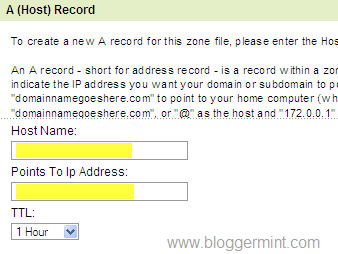
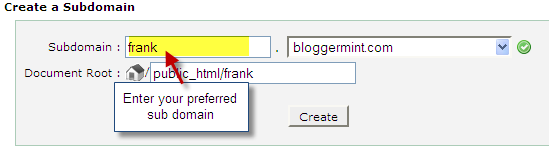
(Optional) For those who have changed the nameservers to your hosting providers nameserver, you need to select Simple DNS Zone Editor option in the Cpanel and select the main domain of which you need to create a sub domain. Enter A Record name as frank (your preferred sub domain) and type the IP address 72.32.231.8 and hit on Add A Record button.
Step 3: Login to your Tumblr account and select Customize, then navigate to Info tab which is visible on top-left position.
Step 4: Now hit on Info and you get a popup box, where you see the basic information and most importantly the setting to setup a custom domain. Check on “Use a custom domain name” and enter your preferred custom sub domain.
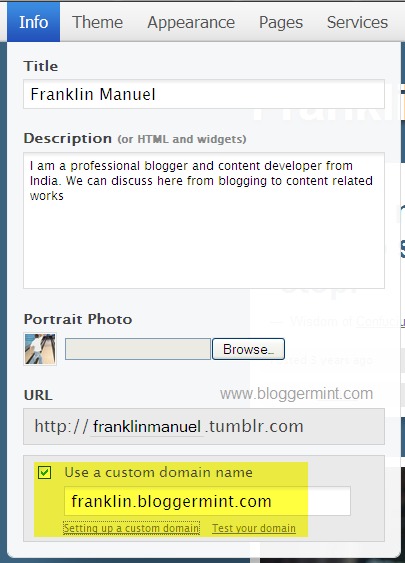
Step 5: Once you finish adding up the custom domain, click on Test your domain link to check whether the DNS is correctly configured. Some times the DNS setup would probably 24 hours to take effect. So you won’t be able to see your Tumblr blog for sometime.