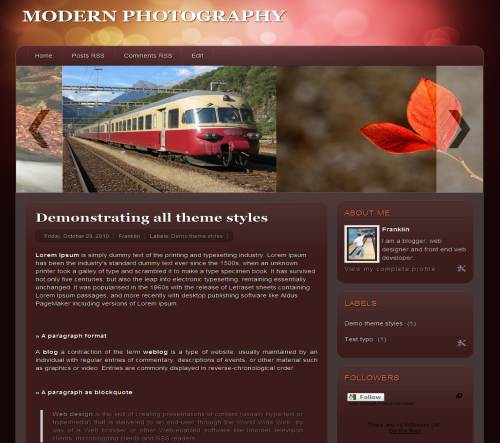
Modern Photography is a fresh style Blogger template designed for the elite photographers to list out their photos using the cool slider. While making this design I was little conscious about the slider to highlight the photos in a pleasant way and finally I came out with this template. Except the slider, I have given a try for new colors comparing to my previous template and its optimized to load as faster as possible. I hope you guys once again enjoy my piece of work.
Template Specifications
- Fixed two column
- Cool Slider from Smoothdivscroll
- Three column footer at the bottom
- Default Blogger social sharing button
The template basically doesn’t require any customization, except you need to change the default images from the post. So to change it, go to Edit HTML and check Expand Widget Templates and search for <div class=’scrollableArea’> and replace the existing image links with yours.
If you still have any doubts, drop in your comments. Don’t forget to check out my Blogger Template.


Pingback: Tweets that mention Modern Photography Blogger Template | Bloggermint -- Topsy.com
NIce theme, thanks for sharing
.-= Design Blog´s last blog ..Create a colorful music studio website =-.
Thanks buddy
Thats a really cool theme, its a shame the slider images to not link to posts though, i.e. use the “featured image” of posts and then link into them, like some other slide-show plugins do.
.-= Jez´s last blog ..Article Demon Review =-.
You can add link to the image if you want. Just place the img tag with <a href='#'> </a>
Hey bloggermint! Love your templates!! Incidentally, I’ve used one of your templates for my blog on http://svinispicks.blogspot.com
And yes, I’ve kept the bloggermint copyright on the pages too (unlike some other blogs)
Can you guess which one it is without looking at the source?
Hi that’s really nice to see you people having the footer credits. However the link ‘blog full of games’ doesn’t belong to me. Some template submission sites are adding sponsored links to my template. So you can remove ‘Blog full of games’ link from the footer.
Nice template. But the slider not working on my blog. I am using custom domain, is that the reason it fails? Any solution to this?
Nope, its not a prob with the custom domain, as its nothing to do with it. Can you I have your URL.
Hey Franklin. I have the same problem with slider images. It works on preview but does not on actual view.
here is the link: http://vusalmustafayev.blogspot.com/
Seems like the problem is indeed with the custom domain.
It works if you go to the blog using the link I provided above, but if you use custom domain of the same blog (which is http://vusalmustafayev.com ) it does not work
great. You are now creating new awesome blogger template.
Nice work
.-= arkimz´s last blog ..20 Free Simple WordPress Themes =-.
thank you for sharing the theme.. I’m currently using it.
http://loybuckz.blogspot.com/
.-= Sherwin´s last blog ..Yasalam 2010 Beats on the Beach hits Abu Dhabi =-.
I am no CSS expert but I would like to have a drop down menu on the title. Is this possible? How to? Please help me to change.
Thank you.
I really like this theme! Thanks you so much for sharing!
Quick question for you: I would like to change the links to be something besides “Post RSS”, “Comment RSS”, etc. I can change the titles on the tab, but I can’t figure out how to change where the tab links to. I’m new to this who CSS thing, so I’d really appreciate your advice!
Thanks again!
Cancel that–I figured it out! Thanks again!
Hi,
I really like this template. I have a photography blog and I’m looking to really spice it up. I’m new to blogging and changing html codes. If I upload this to my blog, the first thing I’ll want to do is:
1. Change some of the pictures in the scroll bar to my own.
2. Change the name of the pages at the top to say Home, My Blog, About Me, My Gear, and delete both RSS feed links.
3. I want all of my widgets on my current blog (Followers, Networked Blog Followers, Labels, Fidjit, counter, etc.)
4. Change the Latin to English and do something else with the three-column footer gadgets on the bottom. Not sure what I can put there other than other widgets?
5. Change the background color to black if possible or a darker burgundy.
Can you please help me? I don’t know how to do any of this. Your help will be much appreciated. I absolutely love this template and want to use it for my photo blog at http://judysphotogallery.blogspot.com. Thank you so much.
Judy
Contact me at bloggermint [at] gmail [dot] com
Its hard for me to tell everything through comments.
Hi Again,
I left you the message at bloggermint@gmail.com. Thanks.
Judy
Hi Franklin,
I uploaded the template and it looks great. I figured out how to widen the template and I even answered some of my own questions above. Just a few things I’d like to change. How do I:
1. Change the template color to all black, or to the darker burgundy color that’s outside of the posting and sidebar area?
2. Change the pictures in the scroll bar to my own. My photos are saved on my hard drive; they are not hosted on a web site.
3. Change the name of the pages at the top to say Home, My Blog, About Me, My Gear, and delete both RSS feed links. I don’t want to link these pages to a web page.
Any help you can give me would be much appreciated. Thank you.
Judy
Hi,
is possible to add a new column in the left side in this themplate?
THX
Adding a new column will spoil the look of the template.
Pingback: 60 Best and Free Blogger Templates for 2011
Hi, I have a little problem to insert images instead of the default, as you can tell me how to do it because I do not ravine: ( Help Me!
Go to Edit HTML in your Blogger dashboard and check on Expand Widget Template. After doing those search for <div class=%u2019scrollableArea%u2019> and below this element you will find the image path. So you need to replace the default image path with yours.
Hi Franklin, sorry, how do i find my own image path??
Hi Franklin,
How do I move the tabs from the side bar to the top of the page beside the “Home” tab?
I have tried dragging and dropping in the Design area, but the tabs won’t stick.
Cool template!
Thank you.
Can you tell me what you mean by tabs here?
Hi. Thank you for designing such a good blogger template with photographers in mind. I have changed the stock photos for mine successfully but I have encountered a problem with display on IE. I use Chrome and it displays perfectly but in IE7 the date and labels bar across the page before the first blog post appears as a vertical line of letters!!
Any suggestions or is the template only suitable for the latest IE?
My photo blog is at:
http://brianyoungphotography.blogspot.com/
Thank you
Brian
The blog is not compatible with IE7, I will fix it when I am free
How do I add similar style pages to each of my individual tabs? For example, if I want to add a page called “About Me” that looks similar to my “Home” page?
Thanks
PS.(great template)
Hi Franklin,
I’ve sent you an email. Hope to hear from you soon. Thanks for sharing
Replied your mail.
how do i am edit images in slide show please tell me
Read the post carefully. I have told about it in the post itself
I did ctrl + f to search for this in expand widgets and it is coming up with “Phrase not found”
Have you changed the pathway since then as I am lost.
What have you searched? To wrap code use
for commentsI found the section to change the images from the demo ones (in the slide area) to my own. I attempted to change but instead it has come up with a blank spot in the slide.
I am attempting to link from my flickr account.
You have to manually link up the image URL. Share your blog URL, so that I can help you
can i ask how to link the image in the scroll bar to new page to show the detail for that image .. ??
thank you
I’ve just put my custom domain name on my site with your template, and the photo slider stopped working… Do you think you could help me in some way?
Thanks!
Re-download the template from our source. We had fixed that issue
Thanks a lot! Really nice template!
i like it.
Slider pro
.
how do i remove the borders from the pictures in my posts?
hey nice template…how can i customize the tabs? like customize it to pages of my blog? Thanks!!!
Bellissimo modello, perfetto in tutto, complimenti. Grazie e buon lavoro.
this template allowing me to fiddling banners and background colors blog. and i also modified this template according to my taste.
thanks for original template.. i like it
hi
I am at a lost how to link my photos in the slider. I manage to put lots of photos in there. I get confused when you say
You can add link to the image if you want. Just place the img tag with <a href='#'
Where do i put these. A better explanation would be helpful. I have had many slider templates, but the link section is always there. Hope you can help. Also, on page elements, when i try to move any of the footer at the bottom, they disappear. At the moment they are all saying Labels, it won't let me put say my recent post widget there.
Thank you.
Hi Franklin,
I’ve sent you an email. Hope to hear from you soon.
Thanx for your help
Liz
Hi,
Where in the code can I change the pictures below the header to my own?
Amanda
Dear Sir, how can I change top buttons like – Home ,posts Rss, comments Rss , Edit….How I change this??…
Hi, your template is phenominal. The idea behind is awesome and I love how it looks. Could you help me with one thing though? The words below the title of a post (date, name of blogger, labels etc) appear vertically on my blog and have to be read downwards rather than from left to right. What could the problem be?
Just read the same problem above, I guess you havn’t yet fixed it for IE7 compatibility. Great job though!
Hola Franklin,
soy David Gámez ante todo darte las gracias por este maravilloso template pero tengo un pequeño problema con el cuando inserto fotos en los post no puedo centrarlas siempre se ponen en el lado izquierdo del post.
¿Podrias ayudarme? Gracias.
Hello,
My site has your beautiful template but today when checking the site lightbox doesnt work and its a feature i like on my site. Please check it out @
bestdreamcars.blogspot.com
Until then I’m using a different template
Can you insert a hyperlink to the images?
How do I can do?
Thank you.
Very cool template thanks for sharing.. Everything works perfectly, just that i wonder how to make the slider to move faster or slower.. thx in advance
Hi shaz: find “autoScrollInterval” and change the number. I hope it will work!
Liz
Pingback: Best and Free Blogger Templates for 2011 | Gofreshers.com
Pingback: 100 Best Free Blogger Templates for 2012
hi buddy..
Thanks 4 sharing its really awesome
I absolutely love it. Thanks for sharing.