Once again I am happy to release another a unique layout Blogger template – Smash Magazine. Don’t ask me how this name came, its just a accidental name and at one perspective it matches too. I want to tell something special about this template. For the first time I have used a paid slider purchased from Code Canyon and releasing this template for free. So kindly KEEP THE FOOTER LINK INTACT to support me for releasing this template. I hope you guys support me.
Update: The static page issue has been fixed. Re-download the template file to see the change.
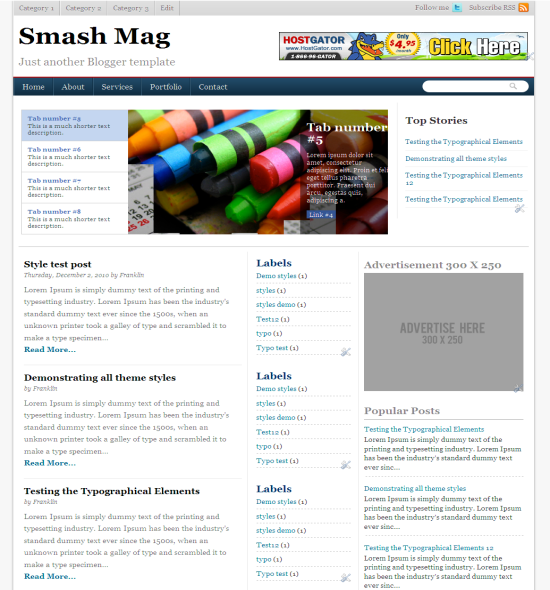
Template Specifications
- Three Column
- Cool slider developed from Makfak
- Ads ready template
- Cool navigation menus
- Three column footer
To change the image slider text and the image search for <div id='slider'> on the template and change accordingly.
If you need my help in setting up the template drop in your comments.


Never mind, I figured it out. Your template is great and easy to use for novices like me, only I also wish I could change the menu bar colors. I have a few different sites and it would be nice to customize them. Still, your template is sooo much better than so many of the other ones out there. Thanks for sharing. Since I can use your basic template I’d consider buying one from you next time I update because I know yours works.
thanks for..
How do I adjust the number of posts that appear on the home page?
Go to Settings > Formatting and change the number of post on the home page.
Thanks for the wonderful template. But Is there any way to remove the column in the middle?
Pingback: 100 Best Free Blogger Templates for 2012 | Printable Paper & Trailer's HD
sir, how to remove the slider column?
Pingback: Help Pakistan » 40 New XML Templates For Blogger
Hi! Your template is really great! Terrific! May I know how to remove the 3 small widgets (HTML/JavaScript at the upper right part, i don’t know what are they for? ) above the Top Stories Box? Also, how do i edit/ remove the 3 tabs at the uppermost part of the template (Category1, 2, 3 and Edit). Please enlighten me. Thanks!
Hi 1 thing i want to incorporate, In search box i want my google ad search should show. Any idea how to do that
Hi. I am using your great template and already made several changes with the code. Can you please tell me what you did to show the full text if I choose to add another page and link it on the topnav? I made an about page and link it to ‘about’ on the topnav but it just show a fraction of the full text and the read more button. I have read the previous comments and knew that you already updated the template. If I would change it with what I have now, I will redo all the changes I made. Hope you understand my dilemma, just please tell me the changes you made to solve the problem and I’ll follow it. Thank you very much. Hope you’ll consider this request. God bless!
Hi – I LOVE this layout & have been using it for some time now. I have done a couple of changes to the HTML & all was great until recently – there have been a few funky things happening.
1. After the top slider vanishes & features my rolling list of categories, there is a red X next to the title.
2. My ‘Share’ buttons are not showing up at the end of posts. I have selected this feature in the blogger basic settings, but they (add to FB, Tweet, Pin, etc.) are not showing up.
THANK YOU SO MUCH FOR YOUR HELP & FOR THE AMAZING WORK!!!
hi Guys i have recently apply this template check how my site is looking i have fix all issues related to this theme! Techinformania