


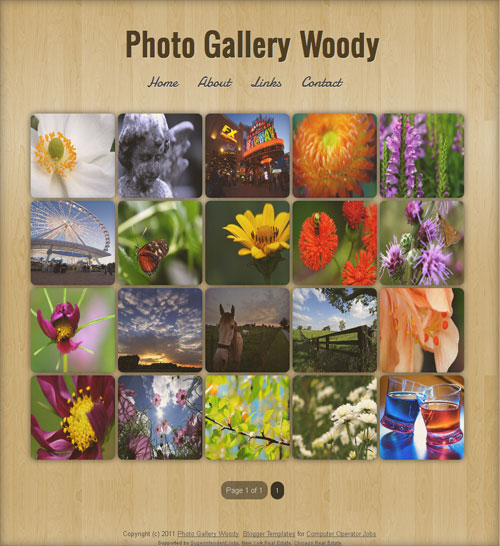
We are proud to release our freemium Lightbox-implemented blogger templates, Photo Gallery Dark and Photo Gallery Woody. To spice up the look, CSS3 implementations such as box shadow, border radius, and transition have been made in these two templates. Also, Google Custom webfonts Damion and Oswald were used for blog header and navigation bar.
Some other features :
1. Auto-thumbnail generation
2. Numbered bottom page navigation
3. Cool post comment avatar style
4. Fade in-out effect using CSS3
5. Lightweight
6. Fast-loading
Photo Gallery Dark
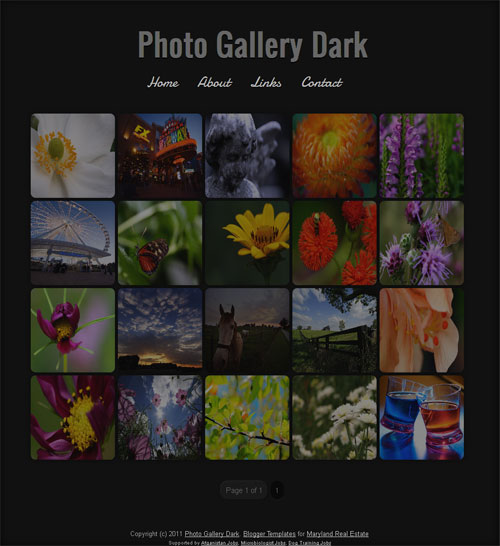
Photo Gallery Woody
Template Instructions
To set the number of thumbnails/posts to be shown in the home page, go to Blogger Dashboard > Settings > Formatting > Set the number of Posts to be shown in home page as 20.
We have enabled the lightbox effect only for the images on homepage and archive pages. If you want to add lightbox even for single post images, add rel=”lightbox” before the href attribute.
Please keep the footer credit links intact. If you want to remove the link you have to pay a little fee. Also check our Blogger Template site Blogger Templates Hub Blog for latest blogger templates.