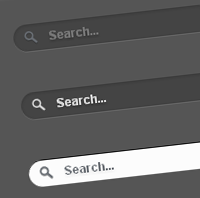
Today’s tutorial is on creating Apple-inspired search box or search field using CSS3 alone. The search field expands slowly when focused/clicked. This animation effect achieved purely using CSS3 transition property. Also, we have used other CSS3 properties such as border-radius, box-shadow and text-shadow to create cool effects.
Here is the code for the searchbox.
<form method="get" action="/search" id="search"> <input name="q" type="text" size="40" placeholder="Search..." /> </form>
And the following are CSS codes of three different styles of the search box.
Search Box on Dark Background

#search {
}
#search input[type="text"] {
background: url(search-dark.png) no-repeat 10px 6px #444;
border: 0 none;
font: bold 12px Arial,Helvetica,Sans-serif;
color: #777;
width: 150px;
padding: 6px 15px 6px 35px;
-webkit-border-radius: 20px;
-moz-border-radius: 20px;
border-radius: 20px;
text-shadow: 0 2px 2px rgba(0, 0, 0, 0.3);
-webkit-box-shadow: 0 1px 0 rgba(255, 255, 255, 0.1), 0 1px 3px rgba(0, 0, 0, 0.2) inset;
-moz-box-shadow: 0 1px 0 rgba(255, 255, 255, 0.1), 0 1px 3px rgba(0, 0, 0, 0.2) inset;
box-shadow: 0 1px 0 rgba(255, 255, 255, 0.1), 0 1px 3px rgba(0, 0, 0, 0.2) inset;
-webkit-transition: all 0.7s ease 0s;
-moz-transition: all 0.7s ease 0s;
-o-transition: all 0.7s ease 0s;
transition: all 0.7s ease 0s;
}
#search input[type="text"]:focus {
width: 200px;
}
Search Box on Light Background

#search {
}
#search input[type="text"] {
background: url(search-white.png) no-repeat 10px 6px #fcfcfc;
border: 1px solid #d1d1d1;
font: bold 12px Arial,Helvetica,Sans-serif;
color: #bebebe;
width: 150px;
padding: 6px 15px 6px 35px;
-webkit-border-radius: 20px;
-moz-border-radius: 20px;
border-radius: 20px;
text-shadow: 0 2px 3px rgba(0, 0, 0, 0.1);
-webkit-box-shadow: 0 1px 3px rgba(0, 0, 0, 0.15) inset;
-moz-box-shadow: 0 1px 3px rgba(0, 0, 0, 0.15) inset;
box-shadow: 0 1px 3px rgba(0, 0, 0, 0.15) inset;
-webkit-transition: all 0.7s ease 0s;
-moz-transition: all 0.7s ease 0s;
-o-transition: all 0.7s ease 0s;
transition: all 0.7s ease 0s;
}
#search input[type="text"]:focus {
width: 200px;
}
Apple.com inspired Search Box

#search {
}
#search input[type="text"] {
background: url(search-white.png) no-repeat 10px 6px #444;
border: 0 none;
font: bold 12px Arial,Helvetica,Sans-serif;
color: #d7d7d7;
width:150px;
padding: 6px 15px 6px 35px;
-webkit-border-radius: 20px;
-moz-border-radius: 20px;
border-radius: 20px;
text-shadow: 0 2px 2px rgba(0, 0, 0, 0.3);
-webkit-box-shadow: 0 1px 0 rgba(255, 255, 255, 0.1), 0 1px 3px rgba(0, 0, 0, 0.2) inset;
-moz-box-shadow: 0 1px 0 rgba(255, 255, 255, 0.1), 0 1px 3px rgba(0, 0, 0, 0.2) inset;
box-shadow: 0 1px 0 rgba(255, 255, 255, 0.1), 0 1px 3px rgba(0, 0, 0, 0.2) inset;
-webkit-transition: all 0.7s ease 0s;
-moz-transition: all 0.7s ease 0s;
-o-transition: all 0.7s ease 0s;
transition: all 0.7s ease 0s;
}
#search input[type="text"]:focus {
background: url(search-dark.png) no-repeat 10px 6px #fcfcfc;
color: #6a6f75;
width: 200px;
-webkit-box-shadow: 0 1px 0 rgba(255, 255, 255, 0.1), 0 1px 0 rgba(0, 0, 0, 0.9) inset;
-moz-box-shadow: 0 1px 0 rgba(255, 255, 255, 0.1), 0 1px 0 rgba(0, 0, 0, 0.9) inset;
box-shadow: 0 1px 0 rgba(255, 255, 255, 0.1), 0 1px 0 rgba(0, 0, 0, 0.9) inset;
text-shadow: 0 2px 3px rgba(0, 0, 0, 0.1);
}
Have a look at the demo or download the source file. Drop your comments down here if you have any suggestions or opinions about this cool CSS3 Search box.


This is a great way to do things, more browser friendly and still looks very sleek! Many thanks for releasing.
Fantastic! Would have saved me a lot of time! Thanks very much, would recommend to anyone.
Hey great ! This code really produces very wonderful Search Box. Hey, how to use this for Web Search / Search within Site?? Do we have to replace url by {Site url / http://www.google/search} ??????
Hey, one more question from me please. I want my Search Box to be of this type, since its matching my LOGO. How nd where to copy these codes. I have done in Searchform.php. Did not work….. Shall I save it as .CSS??? Give me some suggestion??
Hi, you’re a wonderful person! Many thanks for sharing this with us. One further request if I may. Is there a way to get rid of the glows in the search field in browsers like Chrome, Firefox etc? I mean the glow that appears when you place your mouse cursor on the search field. That will look even better. There isn’t such glow on apple.com. Sorry if I’m too picky
Thank you again.
Instead of this
#search input[type="text"]:focus {
width: 200px;
}
Do this
#search input[type="text"]:focus {
width: 200px;
outline:none; box-shadow:none;
}
Hei !
Nice One… But How To Insert This To My WordPress,I Can’t Understand…
How to use this in Blogger please describe……………………
@genevois
In css (input:focus) add this line: outline:none;
great tip.
It’s very nice tutorial. but, how to apply this on top right of my blog..
Thank you in advance..
hi there, thanks for that tut. i just want to ask how to create the rest icon !
very nice
but how can i make the transition occur from right to left like in apple.com ?
Awesome man
u did well…
Very helpful. Thank you!
Thank you!
Hi
Nice box but when it gets the focus, a border appears. At least in Chrome. Any idea how to get rid of the (ugly) border ?
Exactly what I need, thanks for sharing.
Will be using this with Google Search and provide you with a feedback once I get it working
Was able to make it work with Google Custom Search for a website i’m doing – pepsquadevents.com/beta/results.html
Used the two page layout and removed Google’s css with the search box found here, styled the submit button a bit.
Bloggermint’s custom site search is way funkier though!
Thanks again and keep up the good work!
Thanks dude! This is exactly what I was looking for. Is there an easy way to create a fallback using jQuery?
I was looking for these search boxes, great share
Thank u so much… I use this search form in my blog
big thanks for this tutorial. more power!
ok, so i tried it, and the box shows up but the magnifying glass and the words “search…” isn’t there, help me?
ya same as koen, how to remove the “ugly” border on chrome
thanks
It looks beautiful on Firefox and Opera. Thanks
But I get an ugly border on Safari! How do I remove it?!
cool, but no search icon (loop image) on the left
Very nice design, but how apply the action of the form?
If I use a js associated at behavior onblur is not really friendly for user, some idea?
Thanks in advanced
Hey! great post!
Nice job!
Well, I’d like to make a suggestion.
In the CSS for:
input[type:"text"]:focus …
you can add:
{…; …; outiline:none;}
That’s it!
Very wonderful job!
Congratulations!
Att.
Marinho
Hi – thanks for the awesome tutorial. It’s a great starting point- I’m adding ajax search and a drop down box including images to make it even more like apple.
add one more property to input box
outline:0;
Hey! great post!
and how to make that not happen if you have already completed the folding box? and clicked outside the form
I would love to use this, but it is not compatible with other browsers. Can you cake it compatible with the dreaded internet explorer?
Great tutorial!
Thank you for this tutorial. I did not know about “transition.” It’s like having a bit of jquery, but 100x easier to do! I know it’ll not work for older browsers, but fortunately, it will have no effect at all.
This is great. best search bar on the entire internet.
I have one embarrassing question. so i put this on my site but how to you specify the search results to go a specific area of your site?
It’s quit helpful.
How do you get it to expand the other way around? Instead of it expanding from left to right, how do you get it to expand from right to left?
Thank you so much.
fine tutorial but a error in the third style.
background: url(search-dark.png) no-repeat
no url of bg?
smart. one fail is that my latest version firefox doesnt search typed text.
Nice post .. I’ll try to follow your instruction to build a smart Search box in my website . If I’ll face any problem, then I’ll surely let you know.
Hello, thank u so much!! it works perfectly!…. But i have a question do anyone knows how to implement google costum search engine with this search box?
Thank U in advance, i would be really greatfull
Great! Pure CSS solution that still looks nice and is completely functional in IE7 and IE8. Had it implemented on my site in less than 5 minutes.
Question, How would I apply this same style all throughout the form. For instance, the option drop down lists and submit buttons too. I mean, it’s kind of useless to use this beautiful textboxes with the rest of the form
Thank you!! great post
Very nice! Thank you for sharing!
Thanks you very much for tips !!