Pure CSS3 Multi Level Drop Down Navigation Menu

Learn Web Design, Coding & much More! 100% Off First Month.

We are back with a cool Multi-level Drop Down Navigation Menu made up of pure CSS with additional effects using CSS3.0 properties such as border-radius, box-shadow, text-shadow and linear gradient. This navigation menu renders perfectly on Firefox, Chrome and also Safari.
HTML

Here is the basic HTML code for this multi-level navigation menu.

<div id="nav"> 
<ul> 
<li><a href="#">Home</a></li> 
<li><a href="#">About Us</a></li> 
<li><a href="#">Our Portfolio</a></li> 
<li><a href="#">One Dropdown</a> 
	<ul> 
	<li><a href="#">Level 2.1</a></li> 
	<li><a href="#">Level 2.2</a></li> 
	<li><a href="#">Level 2.3</a></li> 
	<li><a href="#">Level 2.4</a></li> 
	<li><a href="#">Level 2.5</a></li> 
	</ul> 
</li> 
<li><a href="#">Three Levels</a> 
	<ul> 
	<li><a href="#">Level 2.1</a></li> 
	<li><a href="#">Level 2.2</a></li> 
	<li><a href="#">Level 2.3</a> 
		<ul> 
		<li><a href="#">Level 2.3.1</a></li> 
		<li><a href="#">Level 2.3.2</a></li> 
		<li><a href="#">Level 2.3.3</a></li> 
		<li><a href="#">Level 2.3.4</a></li> 
		<li><a href="#">Level 2.3.5</a></li> 
		<li><a href="#">Level 2.3.6</a></li> 
		<li><a href="#">Level 2.3.7</a></li> 
		</ul> 
	</li> 
	<li><a href="#">Level 2.4</a></li> 
	<li><a href="#">Level 2.5</a></li> 
	</ul> 
</li> 
<li><a href="#">Services</a></li> 
<li><a href="#">Contact Us</a></li> 
</ul> 
</div> 

You would see a skeleton of links without any styles added to that HTML code like shown in the image below.

CSS

Now we’ll start to give the skin to that skeleton of links (stylize) with CSS. Here is the basic CSS code for the menu.

#nav {
    	float: left;
   	font: bold 12px Arial, Helvetica, Sans-serif;
    	border: 1px solid #121314;
    	border-top: 1px solid #2b2e30;
    	-webkit-border-radius: 5px;
    	-moz-border-radius: 5px;
    	border-radius: 5px;
    	overflow: hidden;
}

#nav ul {
	margin:0;
	padding:0;
	list-style:none;
}

#nav ul li {
	float:left;
}

#nav ul li a {
   	float: left;
	color:#d4d4d4;
    	padding: 10px 20px;
	text-decoration:none;
    	background:#3C4042;
 	background: -webkit-gradient( linear, left bottom, left top, color-stop(0.09, rgb(59,63,65)), color-stop(0.55, rgb(72,76,77)), color-stop(0.78, rgb(75,77,77)) );
	background: -moz-linear-gradient( center bottom, rgb(59,63,65) 9%, rgb(72,76,77) 55%, rgb(75,77,77) 78% );
	background: -o-linear-gradient( center bottom, rgb(59,63,65) 9%, rgb(72,76,77) 55%, rgb(75,77,77) 78% );
	box-shadow: 0 1px 0 rgba(255, 255, 255, 0.1) inset, 0 0 5px rgba(0, 0, 0, 0.1) inset;
	border-left: 1px solid rgba(255, 255, 255, 0.05);
        border-right: 1px solid rgba(0,0,0,0.2);
 	text-shadow: 0 -1px 1px rgba(0, 0, 0, 0.6);
}

#nav li ul {
    	background:#3C4042;
    	background-image: -webkit-gradient( linear, left bottom, left top, color-stop(0.09, rgb(77,79,79)), color-stop(0.55, rgb(67,70,71)), color-stop(0.78, rgb(69,70,71)) );
    	background-image: -moz-linear-gradient( center bottom, rgb(77,79,79) 9%, rgb(67,70,71) 55%, rgb(69,70,71) 78% );
    	background-image: -o-linear-gradient( center bottom, rgb(77,79,79) 9%, rgb(67,70,71) 55%, rgb(69,70,71) 78% );
    	border-radius: 0 0 10px 10px;
    	-moz-border-radius: 0 0 10px 10px;
    	-webkit-border-radius: 0 0 10px 10px;
    	left: -999em;
    	margin: 35px 0 0;
    	position: absolute;
    	width: 160px;
    	z-index: 9999;
    	box-shadow: 0 0 15px rgba(0, 0, 0, 0.4) inset; 
    	-moz-box-shadow: 0 0 15px rgba(0, 0, 0, 0.4) inset; 
    	-webkit-box-shadow: 0 0 15px rgba(0, 0, 0, 0.4) inset; 
    	border: 1px solid rgba(0, 0, 0, 0.5);
}

#nav li ul a {
    	background: none;
    	border: 0 none;
    	margin-right: 0;
    	width: 120px;
    	box-shadow: none;
    	-moz-box-shadow: none;
    	-webkit-box-shadow: none;
    	border-bottom: 1px solid transparent;
    	border-top: 1px solid transparent;
}

Once you’ve added that code, you’ll see a stylized navigation menu without dropdowns and hover effects as shown in the image below.

Add the following css code to make the drop down and submenus visible and also for the hover effects.

#nav ul li a:hover,
#nav ul li:hover > a {
    	color: #252525;
    	background:#3C4042;
	background: -webkit-gradient( linear, left bottom, left top, color-stop(0.09, rgb(77,79,79)), color-stop(0.55, rgb(67,70,71)), color-stop(0.78, rgb(69,70,71)) );
	background: -moz-linear-gradient( center bottom, rgb(77,79,79) 9%, rgb(67,70,71) 55%, rgb(69,70,71) 78% );
	background: -o-linear-gradient( center bottom, rgb(77,79,79) 9%, rgb(67,70,71) 55%, rgb(69,70,71) 78% );
    	text-shadow: 0 1px 0 rgba(255, 255, 255, 0.2), 0 -1px #000;

}

#nav li ul a:hover, 
#nav ul li li:hover > a  {
    color: #2c2c2c;
  	background: #5C9ACD;
	background: -webkit-gradient( linear, left bottom, left top, color-stop(0.17, rgb(61,111,177)), color-stop(0.51, rgb(80,136,199)), color-stop(1, rgb(92,154,205)) );
	background: -moz-linear-gradient( center bottom, rgb(61,111,177) 17%, rgb(80,136,199) 51%, rgb(92,154,205) 100% );
	background: -o-linear-gradient( center bottom, rgb(61,111,177) 17%, rgb(80,136,199) 51%, rgb(92,154,205) 100% );
    	border-bottom: 1px solid rgba(0,0,0,0.6);
    	border-top: 1px solid #7BAED9;
    	text-shadow: 0 1px rgba(255, 255, 255, 0.3);
}


#nav li:hover ul {
    	left: auto;
}


#nav li li ul {
    	margin: -1px 0 0 160px;
    	-webkit-border-radius: 0 10px 10px 10px;
    	-moz-border-radius: 0 10px 10px 10px;
    	border-radius: 0 10px 10px 10px;
    	visibility:hidden;
}

#nav li li:hover ul {
    	visibility:visible;
}

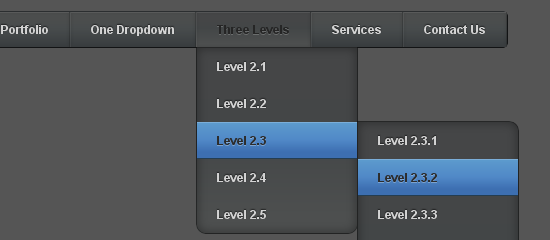
So, it will look like this after you added the code shown above. However, corners of the first and last menu links of the submenus won’t look curved till you add the next piece of CSS code.

#nav ul ul li:last-child > a {
	-moz-border-radius:0 0 10px 10px;
	-webkit-border-radius:0 0 10px 10px;
	border-radius:0 0 10px 10px;
}

#nav ul ul ul li:first-child > a {
	-moz-border-radius:0 10px 0 0;
	-webkit-border-radius:0 10px 0 0;
	border-radius:0 10px 0 0;
}

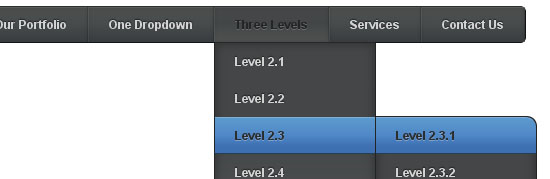
So now, the first and last submenu links will have rounded borders as shown in the image.
And that’s all. You may want to look at the live demo of the Navigation menu or download the resource files. Please don’t forget to share your views and opinions about this Navigation menu tutorial!

June 13, 2011. This entry was posted in CSS, Design, Tutorials and tagged , . Bookmark the permalink.

We Recommend HostGator Hosting

Bloggermint strongly recommends Hostgator Hosting for all of your web hosting needs. Sign up today for WordPress Hosting at just $4.95/month.

Use coupon code "bloggermint" to get 25% discount on any hosting packages. Get an account with Hostgator now!

61 Responses so far!

  1. great articles thank you……………

  2. Hi, This is absolutely great for starters, i have been looking out on web for nice pure css dropdown menu for multilevel navigation and found this finally.
    This is great. But i see odd behaviour in IE, may be the browser settings but i thought i can get some help here.

    And here is my Issue description:
    I use framework 2.0 and visual studio2008 for developing my website.

    1. Majority of End users that will see my website are IE8 or IE7 users, rarely chrome,firefox and the rest.
    On IE if i go to settings and change the mode to IE – IE8 standards then the site menu looks as expected but otherwise the menu dropdown items fall apart and doesnt show under
    parent item and On-Hover at all .

    Temporary solution is that i switch the mode to IE8-IE8 standards everytime i want to demo the menu which i feel isnt right.
    Tried adjusting z-index and several other solutions like “display:block” but none worked.

    2. Also the -moz-box-shadow background RGB colors doesnt show appropriate colors on IE but looks good on Firfox and chrome. This is least priority, i can change property if
    this doesnt work in IE old versions.

    Can these issues be fixed at all.

    At the least i would like the menu to show dropdowns on ‘hover and click’ as expected in three browsers without having to changing the modes, is this acheivable?

    Please can someone suggest.

  3. Hi,

    This works for me perfectly in firefox, safari but on IE8 the dropdown menu is not falling under the parent item.please help, here is the css style that i have used:
    #nav {

    float: left;
    font: bold 12px Arial, Helvetica, Sans-serif;
    border: 1px solid #121314;
    border-top: 1px solid #2b2e30;
    -webkit-border-radius: 5px;
    -moz-border-radius: 5px;
    -webkit-border-radius: 5px;
    -khtml-border-radius: 5px;
    -moz-border-radius: 5px;
    border-radius: 5px;
    /* border-radius: 5px;*/
    overflow: hidden;

    }

    #nav ul {

    vertical-align:middle;
    margin:0;
    padding:0;
    list-style:none;
    display:block;

    }

    #nav ul li {
    float:left;
    width: 155px;
    display: inline-block;
    }

    #nav ul li a {
    float: left;
    color:#E9E9E9;
    padding: 10px 20px;
    text-decoration:none;
    background:#3C4042;
    background: -webkit-gradient( linear, left bottom, left top, color-stop(0.09, rgb(59,63,65)), color-stop(0.55, rgb(72,76,77)), color-stop(0.78, rgb(75,77,77)) );
    background: -moz-linear-gradient( center bottom, rgb(59,63,65) 9%, rgb(72,76,77) 55%, rgb(75,77,77) 78% );
    background: -o-linear-gradient( center bottom, rgb(59,63,65) 9%, rgb(72,76,77) 55%, rgb(75,77,77) 78% );
    /*box-shadow: 0 1px 0 rgba(255, 255, 255, 0.1) inset, 0 0 5px rgba(0, 0, 0, 0.1) inset;*/
    border-left: 1px solid rgba(255, 255, 255, 0.05);
    border-right: 1px solid rgba(0,0,0,0.2);
    /*text-shadow: 0 -1px 1px rgba(0, 0, 0, 0.6);*/
    width: 155px;
    }
    #nav ul li a:hover {
    color:#E9E9E9;
    }
    #nav ul li a:hover,
    #nav ul li:hover > a {
    color: #252525;
    background:#7E7E7E;
    background: -webkit-gradient( linear, left bottom, left top, color-stop(0.09, rgb(77,79,79)), color-stop(0.55, rgb(67,70,71)), color-stop(0.78, rgb(69,70,71)) );
    background: -moz-linear-gradient( center bottom, rgb(77,79,79) 9%, rgb(67,70,71) 55%, rgb(69,70,71) 78% );
    background: -o-linear-gradient( center bottom, rgb(77,79,79) 9%, rgb(67,70,71) 55%, rgb(69,70,71) 78% );
    /*text-shadow: 0 1px 0 rgba(255, 255, 255, 0.2), 0 -1px #000;*/
    width: 155px;
    }

    #nav li ul a:hover,
    #nav ul li li:hover > a {
    color: #2c2c2c;
    background:#7E7E7E;
    background: -webkit-gradient( linear, left bottom, left top, color-stop(0.17, rgb(61,111,177)), color-stop(0.51, rgb(80,136,199)), color-stop(1, rgb(92,154,205)) );
    background: -moz-linear-gradient( center bottom, rgb(61,111,177) 17%, rgb(80,136,199) 51%, rgb(92,154,205) 100% );
    background: -o-linear-gradient( center bottom, rgb(61,111,177) 17%, rgb(80,136,199) 51%, rgb(92,154,205) 100% );
    border-bottom: 1px solid rgba(0,0,0,0.6);
    border-top: 1px solid #7E7E7E;
    width: 120px;
    z-index: 9999;
    /*text-shadow: 0 1px rgba(255, 255, 255, 0.3);*/

    }

    #nav li ul {
    background:#3C4042;
    background-image: -webkit-gradient( linear, left bottom, left top, color-stop(0.09, rgb(77,79,79)), color-stop(0.55, rgb(67,70,71)), color-stop(0.78, rgb(69,70,71)) );
    background-image: -moz-linear-gradient( center bottom, rgb(77,79,79) 9%, rgb(67,70,71) 55%, rgb(69,70,71) 78% );
    background-image: -o-linear-gradient( center bottom, rgb(77,79,79) 9%, rgb(67,70,71) 55%, rgb(69,70,71) 78% );
    border-radius: 0 0 10px 10px;
    -moz-border-radius: 0 0 10px 10px;
    -webkit-border-radius: 0 0 10px 10px;
    left: -999em;
    margin: 35px 0 0;
    position: absolute;
    width: 155px;
    z-index: 9999;
    /*box-shadow: 0 0 15px rgba(0, 0, 0, 0.4) inset;*/
    -moz-box-shadow: 0 0 15px rgba(0, 0, 0, 0.4) inset;
    -webkit-box-shadow: 0 0 15px rgba(0, 0, 0, 0.4) inset;
    border: 2px solid rgba(0, 0, 0, 0.5);
    }

    #nav li:hover ul {
    left: auto;
    display:block;
    }

    #nav li ul a {
    background: none;
    border: 0 none;
    margin-right: 0;
    width: 155px;
    /*box-shadow: none;*/
    -moz-box-shadow: none;
    -webkit-box-shadow: none;
    border-bottom: 1px solid transparent;
    border-top: 1px solid transparent;
    }

    #nav li li ul {
    margin: -1px 0 0 155px;
    -webkit-border-radius: 0 10px 10px 10px;
    -moz-border-radius: 0 10px 10px 10px;
    border-radius: 0 10px 10px 10px;
    visibility:hidden;
    }

    #nav li li:hover ul {
    visibility:visible;

    }

    #nav ul ul li:last-child > a {
    width: 120px;
    -moz-border-radius:0 0 10px 10px;
    -webkit-border-radius:0 0 10px 10px;
    border-radius:0 0 10px 10px;
    }

    #nav ul ul ul li:first-child > a {
    width: 120px;
    -moz-border-radius:0 10px 0 0;
    -webkit-border-radius:0 10px 0 0;
    /*border-radius:0 10px 0 0;*/
    }
    /* fix ie6 small issue */
    /* we should always avoid using hack like this */
    /* should put it into separate file : ) */
    *html #nav ul {
    margin:0 0 0 -2px;
    }

  4. nice post
    thanks

Leave a Reply

Your email address will not be published. Required fields are marked *

You may use these HTML tags and attributes: <a href="" title=""> <abbr title=""> <acronym title=""> <b> <blockquote cite=""> <cite> <code> <del datetime=""> <em> <i> <q cite=""> <strike> <strong>