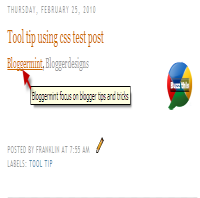


There are many tool tips available over the Internet and most of them really takes time in displaying the tip. This many times irritate your blog visitors. So in order to create a tool tip which should response at a fast rate, I choose CSS. This tutorial will help you to add CSS tool tip on blogger / blogspot blogs. The installation is very simple as it involves only two step.

Step 1: Search for ]]></b:skin> and replace it with the below code
$('.show-tooltip').each(function(){
$(this).after($('<span/>')
.attr('class', 'show-tooltip-text')
.html($(this).attr('title')))
.attr('title', '');
});
]]></b:skin>
Step 2: Now in order to show tool tip for link. Include class=”show-tooltip” title=”Your description here” inside the text link code
For example
<a href=”http://bloggermint.com/” class=”show-tooltip” title=”Bloggermint focus on blogger tips and tricks”>Bloggermint</a>
Now save your template and see the effect. This is a simple script to show tool tip. You can share your own ideas at Bloggermint forum.