

Tumblr the name itself sounds the simplicity, but I don’t know how many are aware of the issue Tumblr doesn’t allow iFrames inside your blog post and this makes embedding the Google maps iFrame code merely impossible. To be more clear I am talking about the iFrame code that we obtain from maps.google.com in order to be used for displaying a static map on Tumblr. This tutorial is helpful for many who write about events on their Tumblr blog. So lets get into the implementation process.
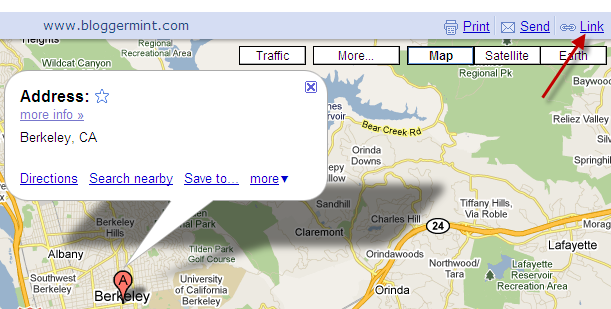
Step 1: Copy the code, that you find on maps.google.com, to be more specific the code that can be found by clicking Link on the top right on the map.
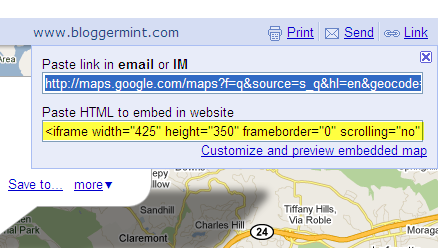
Step 2: Now visit http://robksawyer.com/embedr/ and paste the iFrame code in the text box and click on Convert
Example image
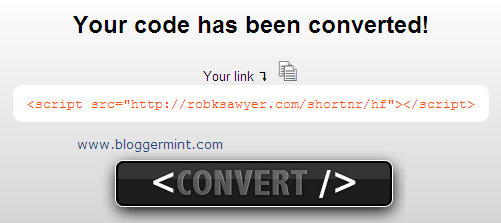
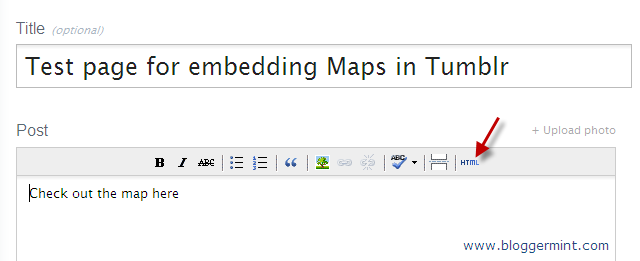
Step 3: Go to your Tumble blog post and paste the code that you got the step 2. To paste the code click on HTML in the post page and enter the script. Now publish the post and check the blog post to see the map embedded on your Tumblr blog.

How did you find the tutorial, simple isn’t it? If you haven’t tried Tumblr try it now.