

Vendor-Specific CSS3 properties is an ugly part of web design. Every time we code we are forced to add -webkit-, -moz-, -o- for different browsers in the stylesheet. In order words its time consuming and increases the size of the stylesheet.

So how to overcome this? The answer is cssFx.js. CSSFx is a lightweight js file that automatically create vendor-specific CSS3 properties depending upon the browser. So with cssFX there is no need of including (-moz-, -webkit-, -o-) thus saving your time.
Install cssFX
Download the cssFX file from here, upload the file to your server and add it to the head along with “cssFx” class name for the stylesheet
<link rel="stylesheet" href="style.css" class="cssfx"> <script src="js/cssfx.min.js"></script>
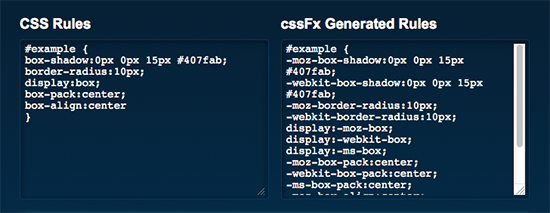
Here is an example CSS code:
So its time to code peacefully without worrying about the vendor-specific CSS3 properties. I am going to use this on my projects, how about you?