How To Create Custom Username (URL) For Facebook Fan Page

MaxCDN Content Delivery Network

Facebook has opened up the feature of setting our own custom username for Facebook fan page on Jun 12th 2009. But sadly only few are aware of how to change the default fan page URL to custom URL. Normally when we create a page, we get the fan page URL as www.facebook.com/pages/Bloggermint/163941377964, but if you have more than 25 liked members for your page, you have the ability to create a custom username, which looks like www.facebook.com/bloggermint.
facebook fan page custom username

How to create custom username

1. Login to your Facebook account

2. Open a new tab and type http://www.facebook.com/username

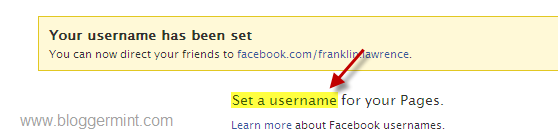
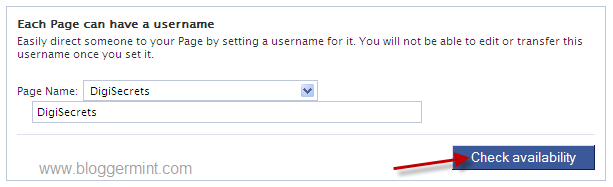
3. Click on Set a username and choose the fan page to add a custom username, if its available
facebook custom username for facebook

Facebook custom fan page username

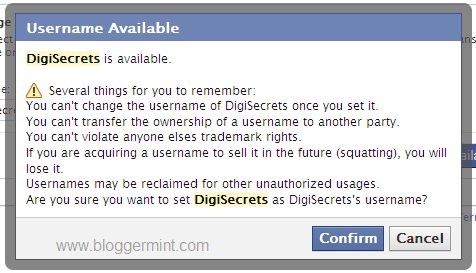
(Note: Before hitting confirm, be sure that you haven’t made any typo errors. The username cannot be changed once set, so be cautious before confirming)

4. Finally hit on Confirm button to change the default URL structure to your own custom username.

The same procedure can be used to even change your Facebook profile page link. I hope this might help to short your fan page URL and some brand value to the URL.

June 2, 2010. This entry was posted in Facebook, Tutorials and tagged . Bookmark the permalink.

We Recommend HostGator Hosting

Bloggermint strongly recommends Hostgator Hosting for all of your web hosting needs. Sign up today for WordPress Hosting at just $4.95/month.

Use coupon code "bloggermint" to get 25% discount on any hosting packages. Get an account with Hostgator now!

No related posts.

20 Responses so far!

  1. This Feature is Really Good and Easy! I Never know this Before, This Custom Link Is neat and Easy to Remember!

    Thanks for Sharing and Explaining With my fan Page :D
    .-= Karthikeyan´s last blog ..Transfer Files Through WiFi in Nokia Mobiles =-.

  2. Pingback: Tweets that mention How To Create Custom Username (URL) For Facebook Fan Page | Bloggermint -- Topsy.com

  3. @ karthick – Yes, custom links adds value to your Facebook page.

  4. Thanks for such a great post dude!! I have over 200 fans, but I was never aware of this, this was the most awaited feature by fan page owners.
    .-= Vishal Sanjay´s last blog ..Top 9 viral marketing success stories of the decade =-.

  5. very Nice tips ….

    hmm.. but i cant change it now…As i had set that for my profile before….
    .-= tricks tips´s last blog ..Monthly Roundup and Traffic Report – May 2010 =-.

  6. @Sudharsan – Try to use your blog name followed by .com. This is the only way.

  7. Great post as usual, Franklin! I did not know it. I have over 500 fans, and this is one of the better features I found to customize a fan page. Thanks for sharing.
    .-= Nicola´s last blog ..Digg v4 Publisher Preview =-.

  8. @Nicola – Nice to see your comments coming in and it greatly helps in marketing your blog.

  9. I already using it, it’s one of the better way to brand your page. Thanks for this tutorial.
    .-= Arafat Hossain Piyada´s last blog ..3 Misconception every beginner blogger should aware of =-.

  10. This is nice, we`ll use it to customize our facebook, I`ve been thinking this was impossible.

  11. Pingback: Avgust

  12. Thanks Frank!

  13. hey, awesome man! didn’t knew how to do it.

    Always wondered how did others do it?

    Thanks Frank!

  14. hey by the way, if you know how to add a custom ‘related post’ box to blog, please let me know?

  15. Thanks, I manged to change one of my page’s long url in to shorter one. :)

  16. I have a book page associated with my personal facebook page. When I went to assign a user name to my book page it reverts to my personal. Why is this? Can I make it go to my book page? How?
    When I set it up I was on my book page and the page name that came up was the name of my book page so I don’t understand what happened. Can you help?

Leave a Reply

Your email address will not be published. Required fields are marked *

You may use these HTML tags and attributes: <a href="" title=""> <abbr title=""> <acronym title=""> <b> <blockquote cite=""> <cite> <code> <del datetime=""> <em> <i> <q cite=""> <strike> <strong>