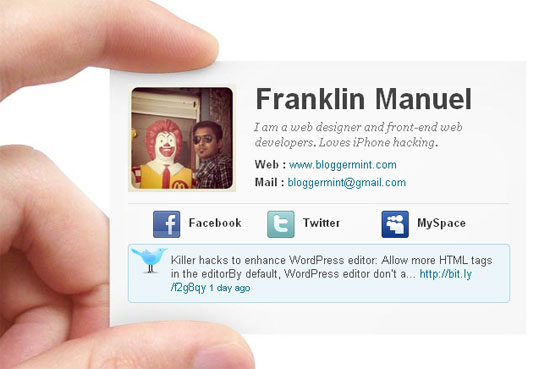
We at Bloggermint always try to introduce new concepts for Blogger templates not only in terms of design but also its function. Previously, we had released a unique Twitter-like Blogger template, Twit Plus. And now, we come with another cool template concept where your blog becomes your business card.

Thanks to psdgraphics.com for the background image.
Template Settings
1. Author Image
<div class='authorimg'>
<img src='http://3.bp.blogspot.com/_ubwIhqPcR6M/TUWWTOU81CI/AAAAAAAABI8/mWQbhk1iClc/s1600/frank default.jpg'/>
</div>2. Author Name
<span class='name'><h3>Franklin Manuel</h3></span>
3. Author Bio
<span class='bio'>I am a web designer and front-end web developers. Loves iPhone hacking.</span>
4. Website URL & Mail
<span class='web'><b>Web : </b><a href='http://www.bloggermint.com'>www.bloggermint.com</a></span>
<span class='mail'><b>Mail : </b><a href='mailto:bloggermint@gmail.com'>bloggermint@gmail.com</a></span>
</div>5. Social Networking Sites Links
<div class='socials'>
<ul>
<li><img src='http://1.bp.blogspot.com/_b8IA1ajBJG8/TUWUKn-HWWI/AAAAAAAAB5Q/LQ6Jx6xKmH4/s1600/facebook.png'/><a href='http://www.facebook.com/franklin.lawrence'>Facebook</a></li>
<li><img src='http://2.bp.blogspot.com/_b8IA1ajBJG8/TUWULifkzoI/AAAAAAAAB5g/w9VT38dst4Y/s1600/twitter.png'/><a href='http://twitter.com/bloggermint'>Twitter</a></li>
<li><img src='http://4.bp.blogspot.com/_b8IA1ajBJG8/TUWUKbwn8WI/AAAAAAAAB5I/aGX4TO7eNl4/s1600/myspace.png'/><a href='#'>MySpace</a></li>
</ul>
</div>6. To Change Twitter URL: Change the bloggermint text to your Twitter handle
<div class='tweets'>
<ul id='twitter_update_list'>
<script src='http://twitter.com/javascripts/blogger.js' type='text/javascript'/>
<script src='http://twitter.com/statuses/user_timeline/bloggermint.json?callback=twitterCallback2&count=1' type='text/javascript'/>
</ul>
</div>Another unique template from us. Tell us what you think about it.


Hey! Awesome template..!
Thats what called e-card…
Thanks
Great one thank you very much !!!!!!!!!
its awesome man
it is best template i have ever seen hats off to you
Really nice to see such a nice comment.
Pingback: Simplify Blogger Template | Bloggermint
Really nice! Wish you release a version for WordPress. A nice thing to have on the about or author page!
We will be releasing a WordPress version soon. Thanks for your words.
Good one! For people who need a virtual business card only.
Tiny thing: The card could start a little lower so it doesn’t seem it cuts into the finger. Other than that, great idea.
this is a brilliant work done in blogger. not that this concept didnt came to mind but the way it is worked out is simple and catchy and all my praises. Mint up the good work.
The e- business card looks great!! Good work.
There is a bit of problem,when I clicked my Facebook,twitter icons it redirected properly when i was on .blogspot but just for testing I changed my sub-domain name to .tk or co.cc . Now the twitter link wont work,whenever its clicked it remains on the same page.
Well i tried solving it by adding TARGET=”_blank”
@Anish: Make sure your cloaking is OFF and Kill frame is set to OFF / No.
Otherwise create account with .co.nr (free too); with above settings you will have no problem
tnx
very2 nice bro..good job
But how i can see internal post?
I cannot have the background image ( two fingers that held the card)
could you help.
Thank you
From where have you downloaded the template?
Anyway you can make a Google+ (centric) version of this? without the Twitter, Facebook, or MySpace reference?
I don’t understand how to create it.
how can we get twitter updates…it doesn’t work for me……can u suggest that part……..
This blog is good
Hello,
I love it and want to use it but having a problem I already have a template for my blogger blog, I want to use it as my contact page when I copied to source code and pasted it in the HTML tab of my page it was too big and the test wasnt in the box any help ?
thats something new…liked it..
Thanks for the treat! If at all possible, as you learn more on business card sizes, would you mind updating your blog with more details? It truly is highly helpful for me. Massive thumbs up for this article!
wow…..thanks
Hello Franklin….
I try to use the Franklin Manuel but the twitter url doesnt work….what can i do?
can you explain a little?
Thanks bro
same problem here
Hey,
whenever i add my own picture, the picture does not get resized and it appears as a large picture. Please help!
thanks!
Pingback: e-Business Card - Blogger Template to Make Online Business Card
Hi Franklin.
I have tried several times but cannot get the template to open.
I have downloaded and tried to open, and tried to open directly from your download link.
Help?
Thanks.
Harvey
Pingback: New Blogger e-Business Card Blog « Technical Recruiting
Pingback: Download Gratis Business Card Blogger Template | Blogger Jelek
Hi Franklin,
Thank you for this super template, One request – Can you guide me how can i add support for pages in this template?
e.g. I can give a link to a page on Home Page which should go to the pagei have created on the same blogger site?